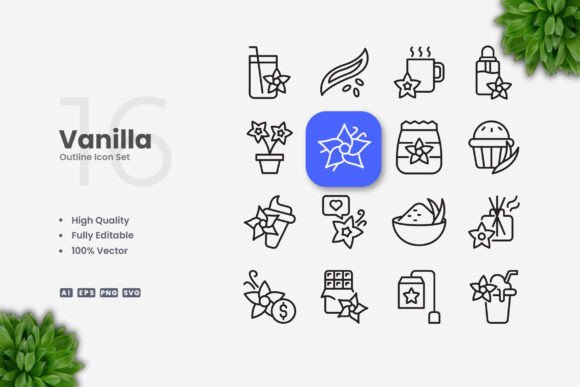
Vanilla Icons: Clean, Simple Vector Icons for Every Creative Project
If you have ever spent hours searching for the perfect set of icons, only to find something too busy, mismatched, or difficult to edit, you already understand why Vanilla Icons exists. This collection offers something refreshingly straightforward: high-quality vector icons designed with simplicity and clarity at their core. Whether you are building a website, designing a mobile app, laying out a book, or creating social media graphics, these icons give you a solid visual foundation without unnecessary clutter.
What Makes Vanilla Icons Different
At its heart, Vanilla Icons is about stripping away the extra noise. Each icon focuses on the essential shape and meaning, making it instantly recognizable even at small sizes. The stroke-based design feels light and modern, while the clean geometry ensures consistency across the entire set. You get one hundred vector files, all built with the same thoughtful approach, so mixing and matching them in a project never feels disjointed.
For anyone who has ever tried to resize a raster icon only to end up with blurry edges, the fully vector nature of this set is a genuine relief. Every file scales cleanly from a tiny button to a massive banner without any loss of quality. That alone saves time and frustration, especially when you are working across multiple platforms or print formats.
Why Simple Icon Design Matters More Than You Think
Simple icons do more than just look neat. They communicate faster. When a user glances at a navigation bar or a mobile app screen, they rely on visual cues to understand where to tap or what to expect. Overly detailed icons slow that process down. Vanilla Icons removes the guesswork by presenting clear silhouettes and meaningful shapes that people recognize almost instantly.
This kind of clarity is especially valuable in contexts where space is limited. A social media post, a mobile app toolbar, or an infographic often has only a few square millimeters to convey an idea. Icons that are too intricate become muddled at those sizes. The clean lines and open spacing in this set keep each icon readable no matter where you place it.
Another benefit is how well simple icons pair with different visual styles. Whether your brand uses bold colors, a minimal black-and-white palette, or a friendly illustrated look, Vanilla Icons adapts without fighting for attention. They support your design rather than overshadowing it.
Where Vanilla Icons Fits Into Real Projects
The versatility of this set becomes obvious once you start thinking about all the places icons appear. Here are a few realistic scenarios where Vanilla Icons can save you effort and improve the final result.
Websites and Mobile Apps
User interfaces depend heavily on icons for navigation, actions, and feedback. A clean icon set helps users move through a site or app intuitively. You can use these icons for menus, search bars, settings panels, shopping carts, profile avatars, and notification indicators. Because the stroke weight is editable, you can match the thickness to your interface design without starting from scratch.
Print Materials
Flyers, brochures, posters, and banners all benefit from simple visual anchors. Rather than using generic clip art that feels dated, you can insert a well-designed icon that reinforces your message. For a local business flyer, a clean icon for location, phone, email, or hours of operation makes the information scannable at a glance. In a poster layout, a single large icon can serve as a focal point that draws the eye without overwhelming the typography.
Books and Ebooks
Educational materials, guides, and manuals often rely on icons to break up text and illustrate concepts. Vanilla Icons works beautifully in margins, callout boxes, or step-by-step instructions. The consistent style helps readers build a mental association between icons and ideas, which improves comprehension.
Social Media Graphics
Social media posts need to grab attention quickly. Adding a simple icon next to a headline or statistic makes the post more visually engaging. Since the files come in PNG format with transparency, you can drop them directly into tools like Canva, Photoshop, or even presentation software without extra steps.
Infographics and Presentations
Data visualization becomes more approachable when you pair charts and numbers with relatable icons. Whether you are presenting quarterly results, explaining a process, or comparing options, Vanilla Icons gives you the building blocks to create a cohesive visual story. The fact that you can change colors easily means you can match your brand palette or use color coding to group related concepts.
Getting Started Even If You Are New to Vector Editing
If you have never opened Adobe Illustrator or CorelDRAW, the idea of editing an icon might feel intimidating. But the process is simpler than most people expect. Vanilla Icons comes with source files in AI and EPS version 10 formats, which are standard across most vector software. You also receive SVG files for web use and PNG files with transparency for quick placement.
To resize an icon, you simply click and drag a corner handle while holding the Shift key to maintain proportions. To change color, you select the icon and pick a new fill or stroke color from the palette. To adjust stroke weight, you locate the stroke panel and increase or decrease the number. That is really all there is to it. Once you try it once, you will see how much control you have over the final look.
For those who prefer not to edit at all, the included PNGs work right out of the box. You can drag and drop them directly into your project. The readme file offers a quick overview of the folder structure, so you never have to guess which file to use.
Important Things to Consider Before Using Vanilla Icons
While this set covers a wide range of common symbols, it is not a massive library with hundreds of niche icons. If your project requires very specific or obscure imagery, you may need to supplement with additional icons or create custom ones. The strength here is quality and consistency rather than quantity.
Also keep in mind that the preview mockups shown in product listings are not included. The files you receive are the individual icon vectors and PNGs themselves, not the composed scenes or backgrounds used for presentation. This is standard practice, but it is good to know upfront so you are not expecting ready-made layouts.
Because the icons are stroke-based, they work especially well in modern flat and line-art styles. If your design direction leans heavily toward filled, solid icons, you can convert strokes to fills or adjust the appearance in your vector software. It takes just a few extra steps, but the flexibility is there.
Practical Value for Different Audiences
Freelancers and small business owners will appreciate how quickly they can produce professional-looking materials without hiring a designer. Bloggers and content creators can maintain a consistent visual style across posts and social channels. Educators and students can use the icons in presentations and handouts without worrying about licensing complications. Marketers and entrepreneurs can build landing pages, email headers, and ad creatives with a polished look that builds trust.
The common thread is that Vanilla Icons removes a barrier. Instead of hunting for the right imagery or settling for something that almost works, you have a reliable set that is ready to use and easy to adapt. That kind of simplicity is rare in a world full of bloated asset packs and complicated licensing terms.
Making the Most of Editable Strokes and Customization
The ability to edit stroke weight is one of the most practical features of this set. If your website uses thick borders and bold typography, you can increase the stroke weight so the icons feel balanced alongside other elements. If your app has a delicate, thin aesthetic, you can reduce the stroke weight to match. This level of control means the icons never feel out of place.
Color customization works the same way. You can keep the icons monochrome for a clean look, use accent colors to highlight key actions, or apply a full palette that reflects your brand identity. Because the vector files are well-organized, selecting and changing individual parts takes only seconds.
Final Thoughts on Choosing Vanilla Icons
Good icon design is easy to overlook when it is done well, and painfully obvious when it is not. Vanilla Icons sits quietly in the background, doing its job without drawing unnecessary attention to itself. That is exactly what a versatile icon set should do. It supports your message, guides your audience, and makes your work look polished.
Whether you are a beginner looking for a first icon set or a professional designer who wants a reliable go-to option for straightforward projects, this collection delivers exactly what it promises. No fluff, no filler, just clean vector icons that work across nearly every medium you can imagine.