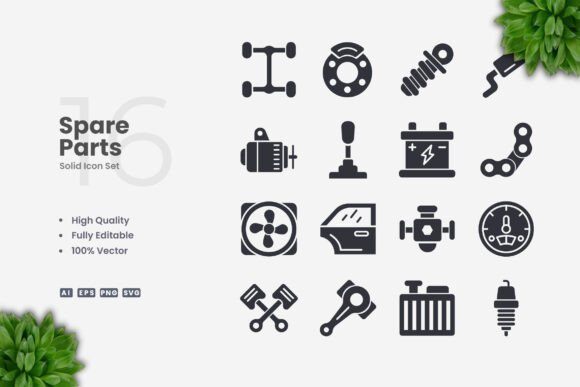
Spare Parts Solid Icons: Streamlined Visuals for Every Project
In today’s fast-paced digital landscape, clear and consistent iconography is more than a design preference—it’s a necessity. Whether you’re building a mobile app interface, laying out a printed brochure, or creating social media graphics, the right icons can communicate complex ideas at a glance. Spare Parts Solid Icons offer a practical, scalable solution for anyone seeking high-quality visuals that work across multiple platforms. This article explores what makes this icon set valuable, where it shines, and how to decide if it fits your next project.
What Are Spare Parts Solid Icons?
At its core, Spare Parts Solid Icons is a collection of 100 vector-based symbols designed with a clean, solid fill style. Unlike outlined or multi-color icon sets, these maintain a uniform silhouette, making them particularly effective for scenarios where readability at small sizes matters. The set focuses on spare parts and mechanical themes—think gears, tools, engine components, fasteners, and related imagery—but the design philosophy extends to any context where simple, unambiguous symbols are needed.
Each icon is crafted to be instantly recognizable. There is no unnecessary detail or decorative flourish. This minimal approach ensures the icons remain legible whether they appear on a 24-pixel mobile toolbar or as part of a large-format poster. The solid style also helps the icons hold their shape when placed over photographs, textured backgrounds, or within busy layouts.
Who Benefits from This Icon Set?
- Web and app designers who need interface elements that load quickly and scale without quality loss.
- Print creators—including flyer designers, poster artists, and infographic producers—who require crisp, resizable graphics.
- Business owners building brand materials such as maintenance guides, spare parts catalogs, or workshop signage.
- Content creators and social media managers looking for consistent visual assets for tutorials, announcements, or how-to graphics.
- Educators and technical writers who illustrate repair steps, assembly instructions, or mechanical concepts.
Because the icons are delivered in multiple editable formats, even someone with basic vector editing skills can tailor them to a specific brand palette or layout.
Key Features That Set This Collection Apart
Understanding the technical and practical features of Spare Parts Solid Icons helps clarify why it suits such a broad range of applications. Below are the standout characteristics you can expect.
High Quality Vector Design
Each icon is built on clean geometric paths with consistent stroke weights and rounded corners where appropriate. This ensures a professional look whether you view the icon on a retina display or printed at high resolution. The solid fill eliminates thin lines that might break up at small sizes, giving you reliable rendering across media.
100% Vector Format
Every icon is vector-based, which means you can scale it from a tiny favicon to a billboard-size graphic without any loss of sharpness. Unlike raster images that become pixelated when enlarged, vector files retain crisp edges at any dimension. This is especially valuable for print projects where resolution requirements vary.
Easy Customization
The files are designed for straightforward editing. You can change colors, resize individual icons, or combine them into new compositions within minutes. The set includes source files in Adobe Illustrator (AI) and EPS Version 10, along with SVG and PNG with transparency. This range of formats means you are not locked into any single software ecosystem.
Drag-and-Drop Simplicity
For users who prefer not to dive into complex vector editing, the included PNG files with transparent backgrounds allow instant placement into presentations, documents, or web mockups. Simply drag the icon into your project—no extra steps required.
Comprehensive File Package
When you purchase or download the set, you receive:
- Source File Ai (Adobe Illustrator native format)
- EPS Version 10 (compatible with many vector programs, including CorelDRAW and Affinity Designer)
- SVG File (ideal for web and responsive design)
- PNG Transparency (ready for immediate use in most applications)
- Readme.txt (contains basic instructions and file descriptions)
This variety ensures that whether you are a seasoned designer using professional tools or a business owner working with simpler software, you can access and modify the icons without friction.
Real-World Applications and Use Cases
The true value of Spare Parts Solid Icons emerges when you consider the practical situations where solid, mechanical-themed symbols solve real problems.
E-Commerce and Parts Catalogs
Imagine running an online store that sells automotive or industrial components. Product categories like “filters,” “belts,” “bearings,” or “fasteners” can each be paired with a distinct solid icon. These small visual cues help customers navigate faster, especially on mobile screens where text-only lists feel cramped. The uniform style of Spare Parts Solid Icons keeps the catalog looking cohesive even as you scale your inventory.
Instructional Content and Manuals
Technical documentation often relies on symbols to indicate tools needed, safety warnings, or assembly steps. Solid icons work exceptionally well here because they reproduce clearly in black-and-white printing and remain legible when reduced to fit narrow margins. For example, an icon of a wrench next to a step signals “you need a wrench” without adding a single word of text. This speeds up comprehension for readers who may not speak the manual’s primary language.
Workshop and Facility Signage
Physical spaces like repair shops, factories, or makerspaces benefit from consistent signage. A solid icon of a gear on a tool board, a warning symbol near a machine, or a parts-organizer label can be printed at any size from the same vector file. The clean design ensures the signs look professional and are understood quickly by staff and visitors.
Infographics and Data Visualizations
When presenting statistics about maintenance schedules, replacement cycles, or equipment efficiency, adding icons to your charts and diagrams makes abstract numbers feel concrete. A row of small engine-block icons can represent fleet size, while a wrench icon next to a percentage indicates repair frequency. The solid style prevents visual clutter, keeping the focus on the data.
Social Media and Marketing Assets
For businesses posting tips, trivia, or promotions related to spare parts or machinery, a library of ready-to-use icons streamlines content creation. You can quickly build a branded template using the SVG files, change the icon color to match your campaign, and export for Instagram, LinkedIn, or Facebook. The set eliminates the need to search for new graphics each time.
Strengths to Consider When Choosing This Icon Set
- Consistency across formats: Because the entire set is drawn in the same style, mixing multiple icons in one layout feels harmonious.
- Scalability without degradation: Vector files mean you never worry about resolution limits, even for oversized prints.
- Broad software compatibility: With AI, EPS, SVG, and PNG included, almost any design workflow can incorporate these icons.
- Time savings: Instead of creating mechanical-themed icons from scratch, you have a ready-made library that covers common needs.
- Low learning curve: Even if you rarely use vector software, the drag-and-drop PNG option gets you started immediately.
Practical Considerations and Limitations
No icon set is perfect for every scenario, and being transparent about limitations helps you make an informed decision.
- Theme specificity: Spare Parts Solid Icons focuses on mechanical and spare parts imagery. If your project requires diverse subjects—such as food, travel, or abstract concepts—you may need to supplement this set with additional icon packs.
- Solid style only: The set does not include outlined, duotone, or multicolor variations. While the solid style is a strength for clarity, some branding guidelines may call for more elaborate icon treatments. However, because the files are fully editable, you can add outlines or gradients yourself if needed.
- Mockup not included: The preview images you see in product listings are for demonstration only. The actual files are the individual vectors, not pre-built scenes or mockups.
- Learning curve for advanced edits: While basic recolor and resize operations are simple, more complex modifications—like combining multiple icons or reshaping paths—require familiarity with vector editing software.
Despite these points, the set delivers strong value for its intended use cases. The trade-offs are minimal when you consider the time saved and the professional polish these icons bring to a project.
How to Evaluate Whether Spare Parts Solid Icons Fit Your Project
Before committing to any design resource, it helps to ask a few targeted questions:
- Does my project involve mechanical, industrial, or spare-parts themes? If yes, this set is likely a strong match. If your subject matter is unrelated, look for a more general icon library.
- Do I need icons that work at very small sizes? Solid fills excel in compact spaces. If your design has tiny UI elements or dense print layouts, this style is advantageous.
- Will I be printing at multiple sizes? Vector files guarantee quality from business cards to banners. The included SVG also supports responsive web use.
- Do I prefer working with Adobe Illustrator, CorelDRAW, or other vector software? The AI and EPS formats cover most professional tools. If you use a less common application, the SVG option offers a universal fallback.
- Do I need editable source files? The ability to change colors, rotate, or combine icons is built into the delivery formats. This gives you long-term flexibility that static image sets cannot provide.
By matching your specific requirements against these questions, you can confidently decide if Spare Parts Solid Icons belongs in your toolkit.
Final Thoughts on Practical Icon Design for Modern Projects
Icon design is often an afterthought in the rush to launch a website, publish a manual, or print a flyer. Yet the difference between a polished visual system and a haphazard collection of clip art is immediately obvious to your audience. Spare Parts Solid Icons offer a middle ground: high enough quality for professional use, yet simple enough for a non-designer to handle with basic software.
The clean, solid style ensures your message is not lost in decorative noise. The variety of included file formats reduces technical barriers, letting you focus on layout and communication rather than file conversion. And because the icons are vectors, they remain future-proof as your projects evolve into new formats and platforms.
Whether you are labeling a parts inventory, illustrating a repair tutorial, or building branded social media templates, this icon set provides a reliable foundation. With 100 unique symbols covering essential mechanical themes, you will likely find the visual shorthand you need to make your content clearer, faster to understand, and more consistent across every touchpoint.
Explore the set, open the source files in your preferred vector editor, and see how a unified icon language can elevate your next project.
Note: Preview mockups shown in promotional materials are for illustration purposes only and are not included in the file package. The set contains individual icon files as described above.