Snack Icons: Simple and Clean Vector Icons for Professional Design Projects
In the world of digital and print design, the right icon set can make or break a project. Whether you are building a website, creating a mobile app, or designing a brochure, icons serve as visual shortcuts that guide users, convey meaning, and enhance aesthetics. However, finding icons that are both simple in style and highly adaptable can be a challenge. This is where Snack Icons step in. This collection offers a straightforward, clean, and versatile vector icon set that meets the needs of designers, marketers, and content creators who value both form and function.
Many designers face the frustration of working with icons that are either too cluttered, difficult to resize, or locked into a single color scheme. Snack Icons are designed to eliminate these obstacles. They are built as fully editable vectors, meaning you have complete control over their appearance. This article explores how this icon set can solve common design challenges, where you can apply it, and how different users can maximize its potential.
Understanding the Need for Flexible Icon Sets
Icons are everywhere. They appear on navigation bars, social media posts, infographics, flyers, and even in printed books. The challenge is that each medium has unique requirements. A website might need icons that scale perfectly on retina displays, while a printed poster requires crisp lines at 300 DPI. A mobile app might demand uniform stroke weights, and an infographic often needs icons that can be recolored to match a brand palette. Without a flexible icon set, you end up wasting time searching for the right file, resizing bitmaps, or trying to recreate icons from scratch.
Another common pain point is inconsistent design language. If you pull icons from different sources, they may have varying line thicknesses, styles, or levels of detail. This mismatch creates a disjointed visual experience, which can confuse users or make a design look amateurish. Snack Icons address this by offering a cohesive set with uniform styling throughout. All icons share a simple, clean aesthetic that works across contexts, ensuring that your visuals remain consistent and professional.
For many professionals, time is a scarce resource. You need icons that are ready to use but also easy to modify. The ability to change a color, adjust stroke weight, or scale an icon without losing quality is not just a convenience—it is a necessity. Snack Icons are built to meet these needs. Because they are vector-based, you can open them in software like Adobe Illustrator or CorelDRAW and instantly make adjustments. This flexibility saves hours of rework and allows you to focus on the creative aspects of your project.
How Snack Icons Address Key Design Challenges
The core strength of Snack Icons lies in their vector format. Unlike raster images (like PNGs or JPEGs), vectors are resolution-independent. You can scale them to the size of a billboard or shrink them to a favicon without any loss of sharpness. This makes the set suitable for a wide range of applications, from high-resolution print to responsive web design.
Another major advantage is customizability. Every icon is fully editable. You can change the stroke weight to make lines bolder or thinner, adjust the color to match your brand, or even delete and add elements. For example, if you are designing a social media banner and need an icon that communicates “sharing,” you can take the default icon and recolor it to fit a gradient background. You can also edit the stroke to create a filled style if that suits your layout better. This level of control means you are never locked into a default look.
The set also includes multiple file formats to suit different workflows. You get source files in AI (Adobe Illustrator) and EPS version 10, which are universal vector formats. For web use, there is an SVG file, which is lightweight and scalable in browsers. Additionally, a PNG transparency file is included for quick use in image editors or presentation software. A Readme.txt file provides basic instructions, making it easy for anyone to start using the icons right away. And because the icons are organized for easy drag and drop, you can transfer them directly into your design software without complicated import steps.
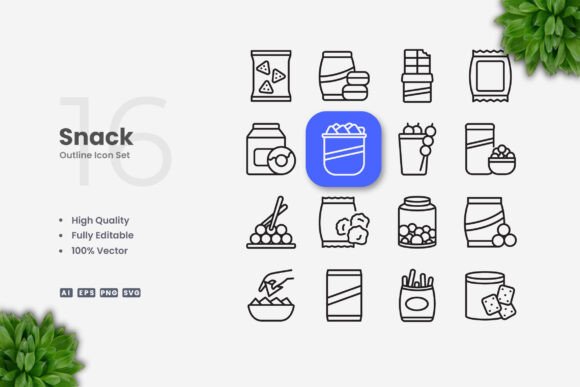
It is important to note that the preview mockup is not included, but the icons themselves are ready for implementation. The mockup is simply a visual representation of how the icons might look in a design; the actual assets are the icons and source files. You can immediately start editing and placing them into your projects.
Practical Applications Across Media
The versatility of Snack Icons makes them useful in many scenarios. Below are specific examples of how different users can apply the icon set to achieve practical outcomes.
Websites and Mobile Apps
For web developers and UI designers, icons are essential for navigation, buttons, and feature highlights. Because Snack Icons are available in SVG format, you can embed them directly into web pages with minimal code overhead. The clean design ensures they load quickly and render sharply on high-density screens. If your project requires a dark mode, you can easily change the icon color using CSS or by editing the SVG file. For mobile app development, the vector source files allow you to export icons at various sizes (e.g., for Android’s mdpi, hdpi, xhdpi) without creating multiple copies manually. Simply scale once and export.
Infographics and Data Visualization
Infographics rely on icons to make data more digestible. A set of simple, clean icons helps viewers quickly grasp categories, trends, or actions. With Snack Icons, you can place an icon next to a statistic or use it as a visual anchor in a flowchart. Because the stroke weight is editable, you can align the thickness of the icons with the other lines in your infographic, creating a cohesive look. If your infographic has a specific color palette, you can recoloring each icon in seconds using Adobe Illustrator or CorelDRAW.
Social Media Graphics and Banners
Social media posts often require quick turnaround times. You might need an icon for a “like” button, a “share” prompt, or a category label. With Snack Icons, you can drag and drop the appropriate SVG or PNG into your design tool, resize it, and change its color to match your brand guidelines. Because the icons are simple, they work well even on small screens like mobile Instagram feeds. For banner ads, you can scale the icons up without pixelation, maintaining a polished appearance across different ad sizes.
Print Materials: Flyers, Posters, and Brochures
Print projects demand high resolution and precise control over design elements. Using vector icons like those in Snack Icons guarantees that your printed material will have sharp edges and consistent line weights. Whether you are creating a flyer for an event, a poster for a campaign, or a brochure for a business, you can place icons alongside headlines and body text. For example, a real estate flyer might include icons for “bedroom,” “bathroom,” and “parking,” each customized to the brand colors. Since the icons are editable, you can also adjust the stroke to appear heavier or lighter depending on the font you use.
Books and Educational Materials
In textbooks, manuals, and educational handouts, icons serve as visual cues that help readers navigate information. A simple, clean icon set reduces cognitive load and makes learning more intuitive. With Snack Icons, you can use the SVG or EPS files to embed icons directly into layout software like InDesign. You can also create custom icon-based diagrams or worksheets by editing the strokes and colors. The consistency of the set ensures that all icons in a book feel like part of a unified visual system.
Tailored Approaches for Different Users
Different professionals will interact with Snack Icons in ways that align with their specific workflows and goals.
Graphic Designers
Graphic designers often need to deliver branded assets quickly. For them, the ability to edit stroke weight and color is essential. A designer working on a corporate identity might take the Snack Icons base set and modify every icon to match the company’s exact line thickness and primary colors. They can also combine icons, resize elements, or create new variations by reusing paths. The AI and EPS source files give designers full access to the vector paths, allowing for creative remixing. The drag-and-drop simplicity means they can iterate fast without technical hurdles.
Web Developers and Front-End Designers
Web developers prefer lightweight, scalable assets that integrate easily with code. The SVG format of Snack Icons is ideal because it can be embedded inline, styled with CSS, and animated if needed. Developers can also use the icons as data URIs or store them in icon font generators. Because the icons are simple, they have small file sizes, which benefits page load speed. Developers who use frameworks like Bootstrap or Tailwind can quickly replace default icons with this set to create a distinct visual identity.
Small Business Owners and Marketers
Small business owners often manage their own marketing materials and may not have deep design skills. For them, Snack Icons provide a professional shortcut. They can drag the PNG transparency file into Canva, a social media scheduler, or a presentation tool. The icons already have clean outlines, so no editing is required. If the business later hires a designer, the vector files are available for further customization. The set removes the guesswork of finding icons that look good together and ensures that even non-designers can produce cohesive visuals.
Educators and Trainers
Teachers and instructional designers need icons that are simple enough to be understood at a glance. Snack Icons work well in slide decks, worksheets, and digital learning platforms. Because the icons are editable, an educator could create a matching activity by recoloring or labeling each icon. Or they could use the icons as visual aids in a presentation, scaling them to fill the screen without quality loss. The consistency of the set helps students focus on content rather than being distracted by inconsistent visuals.
Considerations for Implementation
When using Snack Icons, keep a few practical points in mind to get the best results. First, the set includes 100 vector icons, which provides a solid foundation for most projects but may not cover every niche concept. For common categories like arrows, communication, media, and actions, you will likely find what you need. If your project requires more specialized icons, you can use the existing ones as a base and modify them.
Second, because the icons have an editable stroke, you can adjust the line thickness globally to match the weight of your typography. A good rule of thumb is to set the stroke weight to the same value as the font weight of your headings, creating a harmonious balance. In Adobe Illustrator, you can select all icons and change the stroke property at once, which saves time.
Third, always keep the source files (AI and EPS) as your master copies. Even if you export SVG or PNG for a specific project, you may need to revisit and adjust the icons later. The Readme.txt file provides basic guidance, but you can also explore the layer structure in your vector software to see how each icon is built. This transparency is helpful if you want to learn icon design techniques from a polished example.
Finally, remember that the preview mockup is for demonstration only. The actual value is in the icon files themselves. Use the preview as inspiration, but focus on implementing the icons directly into your own layouts. By doing so, you retain full control over composition, color, and sizing.
Conclusion
Snack Icons offer a practical, high-quality solution for anyone who needs clean, simple vector icons that can be used across digital and print media. The set removes common frustrations like poor scalability, inconsistent styling, and limited editability. With 100 icons, multiple file formats, and full vector customization, it provides a reliable resource for designers, developers, marketers, and educators. Whether you are resizing an icon for a mobile app, recoloring it for a brand guideline, or adjusting stroke weight for a printed poster, this icon set gives you the freedom to create professional results without unnecessary hassle. Focus on your project’s goals, and let Snack Icons handle the visual shorthand.