Eco Battery Icons: A Practical Vector Icon Set for Clean, Professional Design Work
In digital and print design, icon sets often walk a fine line between visual appeal and practical usability. Many promise flexibility but deliver static, hard-to-edit assets that limit creativity rather than enabling it. Eco Battery Icons takes a different approach. This vector icon collection focuses on clean, simple battery and sustainability-themed visuals that are built for real-world editing and reuse. Whether you are designing a mobile app interface, a printed infographic, or a social media campaign, the set aims to provide consistent, editable assets that fit a wide range of professional contexts.
What makes this icon set worth discussing is not just the subject matter, but the structure behind it. Battery icons are a staple in UI design, product packaging, energy dashboards, and educational materials. Having a dedicated set that is intentionally designed to be modified, resized, and recolored without losing quality is genuinely useful for anyone producing visual content regularly. This article explores the strengths, practical applications, and possible limitations of Eco Battery Icons, with a focus on helping you decide whether it fits your specific project needs.
What Eco Battery Icons Offers
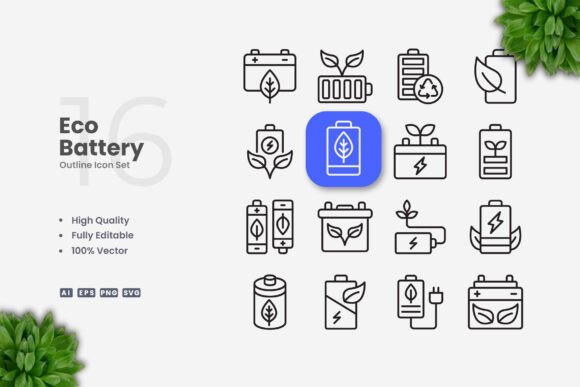
Eco Battery Icons is a collection of 100 vector icons centered on battery, energy, and eco-friendly themes. The icons are delivered in multiple formats including Adobe Illustrator (AI), EPS version 10, SVG, and PNG with transparency. A readme.txt file is included to help you get started quickly. The set is marketed as fully customizable, with editable strokes and the ability to change colors, resize, and adjust stroke weight using standard vector software such as Adobe Illustrator and CorelDRAW.
The scope of the collection covers variations of battery icons at different charge levels, power symbols, energy-related graphics, and combinations with leaf or eco motifs. This makes it suitable for projects that require both literal battery representations and broader sustainability messaging. The design style is intentionally simple and clean, avoiding unnecessary ornamentation while maintaining clear visual hierarchy at small and large sizes.
One of the more practical features is the inclusion of SVG files, which are widely supported across web and interface design tools. PNG transparency files are also provided, which is helpful for quick mockups or situations where vector editing is not immediately required. However, the real value lies in the editable vector formats that let you adapt each icon precisely to your brand guidelines or layout constraints.
Strengths in Real-World Use: Flexibility and Editing Control
The strongest argument for this icon set is the degree of control it gives the designer. Because every icon is vector-based and delivered in editable formats, you are not stuck with a predetermined look. You can change the stroke weight to match your UI’s typographic weight, swap out colors to align with a brand palette, or scale icons up to poster size without pixelation. This level of flexibility is not always guaranteed with pre-made icon sets, especially those that lock you into raster files or flattened shapes.
For example, if you are designing a mobile app dashboard that tracks energy consumption, you might need battery icons at a consistent stroke width of 2 pixels. With Eco Battery Icons, you can open the AI or EPS file, select all icons, and adjust the stroke weight globally. Similarly, if your brand uses a specific shade of green for eco-friendly products, you can apply that color across the set in seconds. This kind of batch editing capability saves significant time compared to sourcing individual icons or custom-illustrating each one from scratch.
The editable stroke feature is particularly relevant for modern UI design. Many contemporary interfaces rely on thin, consistent line weights to maintain visual harmony. Icons that use fixed strokes often clash when placed next to custom elements. Having the ability to fine-tune each icon’s stroke to match your system’s design language is a subtle but important advantage.
Another practical strength is the drag-and-drop ease of use mentioned in the product description. For designers working in Adobe Creative Cloud or similar environments, opening an AI file and dragging icons directly onto your artboard is a familiar workflow. The EPS version 10 format also ensures backward compatibility with older versions of vector software, which is useful for teams that have not upgraded their tools recently.
Quality and Consistency Across the Collection
Icon sets are only as good as their internal consistency. A collection that mixes different visual styles, stroke widths, or levels of detail can look disjointed when used together. Eco Battery Icons maintains a uniform approach: each icon uses a clean, minimal aesthetic with rounded corners and balanced proportions. The stroke weight is consistent across the set, which makes it easy to combine multiple icons in a single layout without visual friction.
The simple style also contributes to readability at small sizes. When you reduce a highly detailed icon to 24 by 24 pixels, the details often blend together and become unrecognizable. By keeping the designs simple, the icons retain clarity even at very small display sizes. This makes them well-suited for app toolbars, notification badges, or table cells where space is limited.
That said, the simplicity does come with trade-offs. If your project calls for highly expressive, illustrated, or photographically detailed icons, this set will not meet that need. The design language is intentionally minimal and functional, not decorative. For corporate presentations, technical manuals, or clean UI screens, this works well. For artistic or whimsical brand identities, you may need a more stylized option.
Who Benefits Most from This Icon Set
Given the combination of editable vectors, eco themes, and simple design, several groups of professionals are likely to find this set particularly useful.
- UI and UX designers working on energy monitoring apps, sustainability trackers, or product dashboards will appreciate the ability to customize stroke weights and colors to match design systems. The inclusion of SVG files also integrates well with prototyping tools like Figma, Sketch, or XD.
- Content creators and social media managers who produce infographics, banners, or posts about renewable energy, recycling, or battery technology can use these icons to add professional visuals without commissioning custom illustrations. The PNG transparency files are handy for quick posts or flyers.
- Educators and publishers creating instructional materials, textbooks, or e-learning modules about electricity, energy conservation, or environmental science will find the clear, minimal style suitable for printed and digital formats. The EPS format ensures compatibility with publishing workflows.
- Small business owners and entrepreneurs developing product packaging, brochures, or website graphics for eco-friendly products can use these icons to reinforce branding. Being able to recolor icons to match brand colors adds a layer of polish that premade icon sets often lack.
- Print designers producing posters, flyers, or banners for sustainability events or campaigns will benefit from the vector format, which allows scaling to any size without quality loss. The inclusion of a readme file also reduces the learning curve for less experienced vector users.
Practical Recommendations and Considerations
To get the most value from Eco Battery Icons, it helps to use it as a base layer rather than a final asset. Because the icons are fully editable, you can treat them as starting points and modify them to suit your specific needs. For instance, you might combine a battery icon with a custom leaf shape to create a more unique visual, or adjust the internal fill to show partial charge levels that are not included in the original set.
One area to be aware of is the intended audience for the files. The set includes AI and EPS formats, which are standard in professional design environments. If you or your team primarily use web-based design tools or open-source vector software like Inkscape, you may need to rely on the SVG files, which offer broad compatibility. The PNG files are also a good fallback, though they do not offer the same editing flexibility.
Another consideration is the scope of the collection. With 100 icons, the set covers a reasonable range of battery and eco symbols, but it does not attempt to be an exhaustive library. If your project requires very specific variations such as battery icons with lightning bolts, charging cables, or complex energy flow diagrams, you may need to supplement this set with additional icons or custom illustrations. However, for most standard uses, the collection provides solid coverage.
The preview mockup is not included, as noted in the product description. This is not a limitation in practice, since the icons themselves are delivered as clean, ready-to-use files. You will need to import them into your own layout or presentation to preview them in context. If you are evaluating the set before purchase, examining the available sample images will give you a reliable indication of the visual style.
Potential Limitations to Keep in Mind
While the set performs well for its intended purpose, a few limitations are worth noting. The simple design style, while practical, may not appeal to brands that prefer more detailed or illustrative graphics. The icons are also centered on battery and eco themes, so they are not a general-purpose icon set. If you need icons for unrelated categories such as communication, travel, or business, you will need to look elsewhere.
The file formats provided are standard, but some users may miss additional formats like PDF for easy sharing or AI-compatible versions for very old software. The EPS version 10 format is widely supported, but it is worth verifying compatibility with your specific version of CorelDRAW or Adobe Illustrator before purchasing.
Finally, because the set is designed for editing, it assumes a basic level of familiarity with vector software. If you are new to programs like Illustrator or CorelDRAW, you may need to invest a little time learning how to adjust stroke weights, change colors, or export the icons in your desired format. The included readme.txt offers basic guidance, but it is not a full tutorial.
Long-Term Value and Effectiveness
For professionals who regularly produce content related to energy, sustainability, or battery technology, this icon set offers lasting value. The vector files do not degrade over time, and the ability to edit each icon means you can adapt them as your brand evolves or as new design trends emerge. A set that allows changing stroke weight is particularly future-proof, since interface design preferences for thin versus thick lines shift periodically.
The inclusion of multiple file formats also supports long-term use across different software and platforms. Whether you are building a design system in Figma today or producing a printed annual report in InDesign two years from now, the icons can be exported and adapted as needed. The PNG transparency files also serve as a reliable fallback for quick or temporary uses.
Effectiveness in real-world projects depends on how well you leverage the editing capabilities. If you use the icons as-is without customizing them, you will get a clean but generic look. The real return on investment comes from taking the time to adjust colors, stroke weights, and sizes to match your specific project requirements. When done thoughtfully, the results can feel custom-made rather than off-the-shelf.
Final Observations
Eco Battery Icons is a focused, practical tool for designers and content creators who need editable battery and eco-themed vector graphics. It prioritizes flexibility, consistency, and simplicity over decorative flair, which makes it well-suited for professional environments where clarity and customization are important. The 100-icon collection covers the essential range of battery states and eco symbols, and the multi-format delivery ensures compatibility with both modern and legacy software.
If your work involves energy dashboards, sustainability communications, product interfaces, or educational materials, this set is worth considering. It will not replace a full custom illustration library, but it does provide a reliable foundation that you can build upon and modify. The ability to edit stroke weight, change colors, and resize without constraints is the central advantage. For professionals who value that kind of control, Eco Battery Icons delivers on its promise.