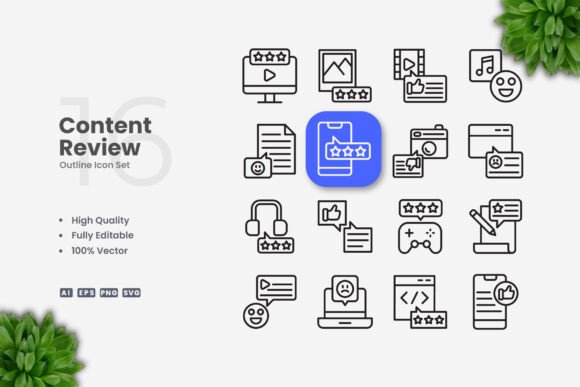
Content Review Icons: A Practical Vector Icon Set for Modern Design Projects
When building digital or print assets, the quality of your icon set can make the difference between a polished final product and one that feels rushed. Content Review Icons offers a focused collection of vector symbols designed to support a wide range of professional applications, from mobile app interfaces to printed promotional materials. This article provides an evaluation of what this icon set includes, how it performs in real-world use, and who is likely to get the most value from it.
What Content Review Icons Offers
Content Review Icons is a curated set of 100 vector icons built around content evaluation, approval, and revision workflows. The icons represent common actions and concepts such as approval marks, rejection symbols, editing indicators, status flags, and content rating elements. The set is delivered in multiple industry-standard formats, making it accessible regardless of which design tools you prefer.
The package includes an editable Adobe Illustrator source file (AI), an EPS Version 10 file, individual SVG files, and PNG files with transparency. A readme.txt file provides basic instructions for accessing and using the assets. This combination of formats ensures that the icons can be opened, edited, and exported from virtually any professional vector editing application, including Adobe Illustrator, CorelDRAW, Affinity Designer, and Inkscape.
Format Coverage and File Preparation
One practical advantage of Content Review Icons is the breadth of file types included. Rather than forcing you to convert between formats or rely on a single ecosystem, the set provides options that suit different workflows:
- AI source file for full, non-destructive editing in Adobe Illustrator
- EPS Version 10 for backward compatibility and cross-application use
- SVG files for web development, responsive design, and integration with front-end frameworks
- PNG transparency files for quick placement in documents, presentations, or mockups where vector editing is not required
For designers working across both raster and vector pipelines, this format coverage eliminates the need to hunt for compatible versions or generate missing file types manually. The presence of SVG files is particularly relevant for teams building web-based review tools, dashboards, or content management interfaces, where scalable, lightweight icon resources are essential.
Customization and Workflow Advantages
Every icon in the set is fully editable. The stroke weights are adjustable, colors can be changed, and individual elements can be modified without damaging the underlying structure. This level of customization is crucial when your design requires a consistent visual language across different contexts, such as maintaining a specific brand color palette or adapting icon weight for mobile versus desktop displays.
The editable stroke feature is worth noting. Many icon sets ship with expanded strokes that cannot be adjusted without time-consuming manual reconstruction. Content Review Icons preserves the stroke as an editable property, which means you can increase or decrease thickness globally or per icon. This is especially useful when you need to match an existing interface style or comply with accessibility guidelines requiring minimum stroke widths for legibility.
Drag-and-drop functionality is supported across the included formats. SVG files can be directly dropped into code editors or web design tools. EPS and AI files can be opened or placed into page layout software like InDesign or presentation tools like PowerPoint. For users who rarely open vector editing software, the PNG transparency files offer a straightforward solution for immediate use.
Quality and Visual Consistency
A well-designed icon set maintains visual harmony across all symbols. In reviewing Content Review Icons, the icons share consistent proportions, uniform stroke weights, and balanced visual density. There is no noticeable variation in line thickness or spacing between icons, which is a common issue in less carefully assembled collections.
The icons are presented with a clean, minimalist aesthetic. They avoid unnecessary detail, which helps them scale cleanly from small interface elements to larger print placements. The simplicity of the design language makes the set suitable for modern, flat, or outline-style interfaces without feeling dated or overly decorative.
For professional use, consistency across an icon set reduces the need for manual correction and ensures that the final product looks cohesive. Whether you are using five icons or all one hundred, they will sit together naturally.
Who Benefits Most from Content Review Icons
This icon set is not a generic, catch-all library. It is purpose-built for content-related workflows, which makes it particularly valuable for specific user groups:
Content Teams and Publishing Professionals
Editors, content managers, and publishing coordinators who work with content approval systems will find icons that directly map to their daily tasks. Status indicators, review flags, approval marks, and revision symbols can be placed into style guides, editorial dashboards, or internal workflow documentation.
UI and UX Designers
Designers building applications for content management, document review, or collaborative editing platforms can integrate these icons into interface components. The SVG format allows for direct embedding into Figma, Sketch, or Adobe XD prototypes, and the editable source files make it easy to adjust colors to match a brand system.
Small Business Owners and Entrepreneurs
Business owners managing their own websites, product documentation, or marketing materials can use Content Review Icons to create clear visual cues for their audience. For example, a service page could use review icons to indicate steps in a client approval process, or a product page could show quality checkpoints.
Educators and Instructional Designers
Course materials, rubrics, assessment guides, and feedback forms benefit from visual indicators. These icons can help students quickly understand status updates, revision requests, or completion stages in a learning management system.
Freelancers and Bloggers
For solo creators who produce content across multiple platforms, having a consistent set of icons for editing, publishing, and reviewing saves time. The icons can be used in blog graphics, social media posts, and client deliverables without requiring additional design resources.
Practical Scenarios and Realistic Use Cases
Consider a small marketing team that manages blog content through a shared calendar. Using Content Review Icons, they could create a visual status system: a checkmark for approved posts, a clock icon for pending review, a pencil for drafts, and a cross for rejected content. These icons could appear on a shared Trello board, a Google Sheet, or a custom dashboard built with the SVG files.
Another example is a freelance designer building a client proofing portal. The icons can indicate whether a design revision has been approved, needs changes, or is waiting for feedback. Because the icons are editable, the designer can adjust stroke weight to match the portal's existing UI style without starting from scratch.
For print use, a publisher creating a submission guidelines PDF could embed PNG versions of the icons to illustrate the editorial workflow. Since the PNG files include transparency, they layer cleanly over colored document backgrounds.
Limitations and Considerations
No resource is perfect for every situation, and Content Review Icons has some constraints worth noting. The set contains 100 icons, which is appropriate for focused content review workflows, but may be too narrow for designers who need a broader library covering general user interface actions such as search, navigation, social media sharing, or e-commerce functions. If your project requires icons across multiple unrelated categories, you may need to supplement this set with additional resources.
The design style is clean and minimal, but it may not suit every visual direction. Brands with highly decorative, hand-drawn, or heavily detailed identities might find the icon set too understated. The icons are outline-based, which works well for modern interfaces but may require conversion to filled variants if your design system demands solid icons.
The preview mockup shown in promotional materials is not included in the download. This is standard practice for icon sets, but something to be aware of if you expected the mockup itself as part of the package.
Finally, while the PNG transparency files are convenient, they are not resolution-independent. For extremely large print applications, such as posters or banners viewed up close, you may need to place the vector versions directly to avoid pixelation.
Long-Term Value and Reliability
Vector icon sets offer enduring value when the files are well-constructed and the formats remain industry-compatible. The EPS Version 10 format, in particular, ensures that the icons can be opened by software released many years ago and likely by future versions as well. SVG files follow an open standard, making them usable across different platforms without licensing restrictions.
The editable AI source file allows you to make permanent changes to the icon family. If your brand evolves or your interface direction shifts, you can update the entire set in one session. This adaptability reduces the need to purchase a replacement set when visual requirements change.
Because the icons are focused on content review rather than transient design trends, they are unlikely to feel outdated quickly. The actions they represent, approving, editing, reviewing, and flagging, remain fundamental to how people interact with content.
Realistic Recommendations for Potential Users
If your work regularly involves content workflows, editorial systems, or collaborative review processes, Content Review Icons provides a practical, time-saving resource. The format flexibility, editable strokes, and consistent visual quality make it a solid choice for professionals who value efficiency and precision.
If your needs are broader or your design direction demands a specific aesthetic not met by this set, it may serve better as a supplementary resource rather than a primary icon library. Evaluate your project's icon requirements before purchasing, particularly whether the 100 icons cover the specific actions you need to represent.
For teams or individuals already using vector software regularly, the customization options reduce friction between acquiring the set and deploying it in a live project. The drag-and-drop capability and multiple file formats mean you can integrate the icons without a steep learning curve.
Ultimately, the value of any icon set comes down to how well it fits into your existing workflow and how much time it saves you. Content Review Icons delivers on the specific use case it was designed for, and for the right user, it can be a dependable asset that performs consistently across projects and platforms.