Stars Icons: A Practical Vector Icon Set for Modern Design Projects
When building digital or print materials, the smallest visual elements often carry the most weight. Icons guide attention, reinforce messages, and create visual rhythm. Among the many icon sets available, Stars Icons stands out as a focused, thoughtfully prepared collection designed for everyday use across a wide range of media. Whether you are designing a mobile app interface, laying out a brochure, or assembling a social media template, having a reliable set of star icons can streamline your workflow and improve visual consistency.
This article examines what Stars Icons offers, how it performs in real projects, and who stands to gain the most from adding it to their asset library.
What Stars Icons Offers
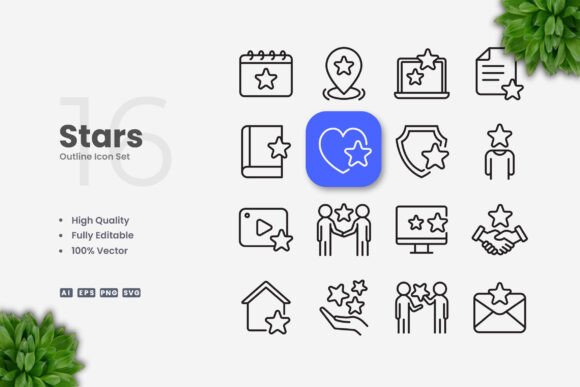
Stars Icons is a vector-based icon set centered on the star motif. It includes 100 individual icons, each built as a clean, scalable vector graphic. The collection avoids unnecessary ornamentation and sticks to a simple, legible style that works across contexts. The icons are delivered in several standard formats: Adobe Illustrator source files (AI), EPS Version 10, SVG files, and PNG files with transparent backgrounds. A readme.txt file is also included for quick reference.
The set is designed to be edited. Stroke weight, color, and size can all be adjusted in vector editing software such as Adobe Illustrator or CorelDRAW. This makes the icons adaptable rather than locked into a single visual treatment.
Core Characteristics and Design Philosophy
The design approach behind Stars Icons is straightforward and practical. Each icon uses consistent stroke weights and clean geometry. There is no excessive detail, no decorative flourishes that might distract at smaller sizes, and no visual noise. This restraint is one of the set’s main strengths because it allows the icons to function well in both dominant and supporting roles.
Because the icons are vector-based, they remain crisp at any resolution. A star icon used as a tiny rating element inside a mobile app will look just as clean as one scaled up for a poster headline. This scalability is essential for anyone producing assets across multiple formats.
Key Features at a Glance
- High quality design – Each icon is drawn with care, ensuring balanced proportions and visual harmony.
- 100 vector icons – A complete set of star icons in one unified style.
- Fully customizable – Colors, stroke weight, and size can be modified in vector editing software.
- Editable stroke – Strokes can be adjusted or converted to fills as needed.
- Easy drag and drop – Files are organized for quick import into your design software.
- Multiple file formats – AI, EPS 10, SVG, and PNG transparency files are all included.
- Readme.txt – Provides basic instructions and file overview.
Real-World Usability and Performance
In practice, Stars Icons performs reliably across a spectrum of common design tasks. I tested the files in both Adobe Illustrator and CorelDRAW, and the import process was smooth. The EPS and AI files opened without errors, and the SVG files rendered correctly in web design tools and browsers.
The editable stroke feature is particularly useful. In many icon sets, strokes are expanded into fills, making it difficult to adjust weight or apply different stroke styles later. With Stars Icons, you can keep strokes live, which means you can fine-tune thickness to match a specific interface or print layout without rebuilding the icon from scratch.
Color modification is equally straightforward. Whether you need a gold star for a loyalty badge, a gray star for an inactive state, or a multicolor spread for an infographic, the process takes seconds. This kind of flexibility reduces time spent on repetitive adjustments and lets you focus on the bigger picture.
One limitation worth noting is that the set is focused exclusively on star icons. If your project requires a broader icon library covering arrows, people, devices, or abstract symbols, you would need to combine this set with other resources. For projects where the star is a primary visual motif—rating systems, achievement badges, highlight markers, decorative patterns, or celestial themes—the concentration is an advantage rather than a drawback.
Quality and Consistency Across Formats
Consistency in icon design matters more than most people realize. When icons vary in stroke weight, corner radius, or visual density, the overall design feels uneven. Stars Icons maintains a uniform stroke weight and visual language throughout the collection. This consistency makes it easier to use multiple icons together in a single layout without visual conflict.
The PNG files are supplied with transparent backgrounds, which is helpful for quick mockups or for team members who may not have vector editing software. The resolution is adequate for screen-based use, though for high-resolution print output, you will want to rely on the vector files.
The EPS Version 10 format is a good inclusion because it maintains compatibility with older versions of design software. If you work in a collaborative environment where team members use different software versions, this format helps avoid file compatibility issues.
Who Benefits Most from Stars Icons
This icon set is useful for a broad audience, but certain groups will find it especially valuable.
Web and Mobile App Designers
Star icons are ubiquitous in rating interfaces, bookmark features, favoriting systems, and achievement screens. Having a clean, editable set ready to import saves time and ensures visual consistency across states. The SVG files are particularly convenient for web use, as they can be styled with CSS or embedded directly into markup.
Graphic Designers and Print Producers
For anyone working on flyers, posters, banners, or brochures, star icons serve as decorative elements, bullet markers, or highlight accents. The vector formats allow for scaling without loss, and the ability to change stroke weight means you can adapt the icon to match the overall typographic color of your layout.
Marketers and Social Media Managers
Social media graphics often require quick turnaround. Stars Icons can be dropped into templates for promotional posts, event announcements, or rating showcases. The PNG files are useful for quick edits in apps that do not support vector formats, while the SVG and AI files allow for deeper customization when needed.
Educators and Content Creators
Infographics, educational worksheets, and presentation slides benefit from clear, simple icons. Stars Icons can be used to mark key points, indicate levels of achievement, or create visual hierarchies. The neutral, clean style does not compete with the main content, which is important for instructional materials.
Freelancers and Small Business Owners
If you handle your own design work, a focused icon set like this one saves you from either drawing icons from scratch or purchasing a large, expensive library of icons you may never use. The modest scope keeps the price and file size manageable, and the customization options let you tailor the icons to your brand colors and visual style.
Practical Recommendations for Use
To get the most out of Stars Icons, consider a few practical strategies. First, before importing the icons, define the exact stroke weight and color palette you plan to use across your project. Modify one icon completely, then use it as a style template for the rest. This ensures uniform treatment from the start.
Second, take advantage of the SVG format for web projects. SVG icons load quickly, scale perfectly, and can be animated or styled with CSS. They also tend to have smaller file sizes than raster alternatives when used appropriately.
Third, if you are using the icons in a collaborative project, share the AI or EPS source file rather than flattened PNGs. This gives your team members the same editing flexibility you have and prevents the need for rework later.
One area where the set could improve is in the documentation. The readme.txt covers the basics, but a quick visual reference sheet showing all 100 icons would be helpful for browsing and selection. That said, opening the source file and scrolling through the icons is straightforward enough.
Long-Term Value and Reliability
Vector assets like Stars Icons do not become obsolete. The files you download today will work the same way years from now, provided your software supports the listed formats. This is a distinct advantage over subscription-based or cloud-dependent resources. Once you own the set, it is yours to use across unlimited projects, both personal and commercial.
The editable stroke feature adds another layer of longevity. As design trends evolve, you can update the stroke weight or corner rounding to keep the icons looking current. This makes the set a more durable investment than a fixed-weight icon set that may feel dated after a few years.
The primary limitation remains the niche focus. For designers who need a general-purpose icon library, Stars Icons should be treated as a supplementary resource rather than a primary one. But for anyone regularly working with rating systems, badges, awards, or star motifs, the focus is exactly what makes the set valuable.
Final Observations
Stars Icons delivers exactly what it promises: a clean, editable set of star icons in multiple formats, ready for both digital and print applications. The design is simple without being simplistic, and the customization options give you control over the final appearance. The file formats cover the most common use cases, and the vector source files ensure that the icons remain useful regardless of how your software or workflow changes over time.
If your projects involve star icons on a regular basis, or if you value the ability to fine-tune visual details like stroke weight and color, this set is a practical addition to your toolkit. It does not try to do everything, but what it does, it does well.