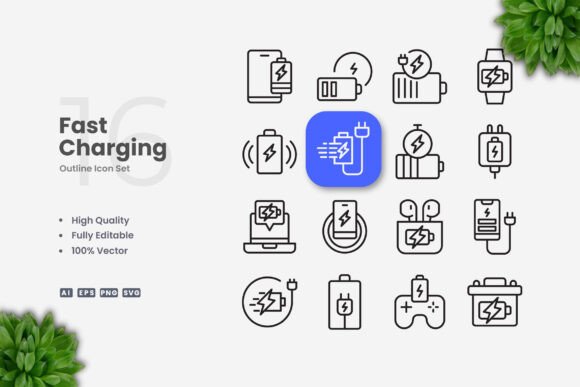
Fast Charging Icons: Clean Vector Design for Modern Digital Projects
When you are building a website, designing a mobile app, or preparing print materials, the icons you choose can make a significant difference in how users perceive your content. Fast charging icons have become especially important in recent years as more devices support rapid power delivery. The right icon set communicates speed, efficiency, and reliability at a glance. But not all icon collections are created equal. Simple and clean icon design is essential for maintaining visual clarity across different platforms and screen sizes. Whether you are working on a social media campaign, an infographic, a flyer, or a banner, having a consistent and professional set of icons saves time and elevates your work.
Vector-based fast charging icons offer flexibility that raster images simply cannot match. Because they rely on mathematical paths rather than pixels, you can scale them up for a billboard or down for a mobile button without any loss of quality. This scalability is one of the primary reasons designers choose vector formats for their projects. The ability to resize, change color, or edit stroke weight directly in vector software like Adobe Illustrator or CorelDRAW means that you are not locked into a single look. You can adapt the icons to match your brand guidelines, adjust them for dark mode interfaces, or create variations for different use cases without starting from scratch.
Why Clean Icon Design Matters for Fast Charging Symbols
Icons are a universal language. A well-designed fast charging icon should be instantly recognizable, regardless of the viewer's background or language. Simple, clean shapes reduce cognitive load and allow users to process information quickly. When you strip away unnecessary details, the core meaning of the icon becomes more prominent. For fast charging symbols, this often means a lightning bolt, a battery with a lightning indicator, or a stylized plug combined with a speed element. The goal is to communicate "fast power delivery" without visual clutter.
Clean design also improves accessibility. Users with visual impairments or cognitive disabilities benefit from icons that have clear outlines and sufficient contrast. Editable stroke weights give you the power to adjust thickness for better visibility on different backgrounds. A stroke that is too thin might disappear on a busy infographic, while a stroke that is too thick could look clumsy in a mobile app interface. Having control over these parameters ensures that your icons remain functional and attractive in any context.
Another advantage of simple vector icons is their compatibility with responsive design. As screens vary from smartwatches to large monitors, an icon that looks great on a 27-inch display should also be legible on a 1.5-inch wearable screen. Clean geometry and minimal detail help icons maintain their integrity at tiny sizes. This is especially critical for fast charging indicators on device lock screens, notification bars, or battery widgets, where space is limited and clarity is paramount.
Practical Workflow Benefits for Designers and Developers
One of the most overlooked aspects of icon design is the workflow efficiency it brings to a project. When you download a set of fast charging icons that includes source files in AI, EPS, SVG, and PNG formats, you are equipped to handle almost any delivery requirement. The SVG file is ideal for web use because it is lightweight and scales perfectly on retina displays. The PNG version with transparency is useful for quick mockups or legacy software that does not support vectors. The AI and EPS files give you full editing power in professional design applications.
Editing stroke weight is a common need when icons are used across different media. A poster might require bolder lines to be readable from a distance, while a mobile app might benefit from thinner, more delicate strokes that align with modern UI trends. With vector files, you can adjust the stroke weight in seconds rather than redrawing the icon. Similarly, changing the color of an icon to match a specific brand palette is straightforward. Instead of hunting for the correct hex code and manually updating each element, you can select the entire icon group and apply a new fill or stroke color globally.
Drag and drop functionality further simplifies the process. You can open the folder containing the icons and drag them directly into your design software without going through import dialogs or conversion steps. This may sound like a minor convenience, but when you are working on a tight deadline, every second counts. The included readme.txt file provides any necessary instructions, so you are never left guessing about how to use the files properly.
Versatility Across Industries and Platforms
Fast charging icons are not limited to tech blogs or battery manufacturer websites. They are used in a wide range of industries and applications. Consider a fitness app that tracks device battery levels for wearable accessories. Clean icons help users quickly understand their device status during a workout. In e-commerce, product pages for chargers, power banks, and cables often feature fast charging icons to highlight compatibility. A simple lightning bolt symbol can communicate "fast charge supported" more effectively than a paragraph of text.
Print materials also benefit from vector icons. Flyers promoting a new smartphone model might include a fast charging icon to emphasize one of its key features. Banners at electronics trade shows need large, crisp graphics that remain sharp when printed at scale. Because the icons are vector-based, you can enlarge them without worrying about pixelation or jagged edges. This reliability makes them suitable for professional printing workflows where image quality is non-negotiable.
Social media graphics are another area where fast charging icons shine. Platforms like Instagram, LinkedIn, and Twitter often require images that are both informative and visually appealing. An infographic comparing charging speeds across devices becomes more engaging when accompanied by consistent, clean icons. The same icon set can be used in a series of posts to maintain brand cohesion. Subscribers will start associating the specific lightning bolt design with your content, which builds recognition over time.
Books and eBooks, particularly those focused on technology, consumer electronics, or DIY projects, often include icons to illustrate concepts. A guide about USB standards, for example, might use fast charging icons to differentiate between standard charging and quick charging protocols. Having editable vector files ensures that the icons can be resized to fit the page layout without losing detail. The ability to change stroke weight also helps match the icons to the book's interior design style, whether it is minimalist or more detailed.
What to Consider Before Choosing an Icon Set
When you are evaluating a collection of fast charging icons, look beyond aesthetics. The file format support is crucial. A set that includes AI, EPS, SVG, and PNG covers the majority of use cases you will encounter. The AI source file is particularly valuable if you use Adobe Illustrator, as it preserves layers, groups, and other editing features. EPS version 10 is widely compatible with older and newer vector editing programs, ensuring that you are not locked into a specific software version.
Customizability is another factor. Some icon sets are distributed as flat images that cannot be modified. You want icons that are 100% vector and 100% customizable. This means each element can be selected, moved, recolored, or deleted independently. Editable stroke capabilities give you fine control over line thickness, which directly impacts readability and visual harmony. The ability to adjust stroke weight is especially important when you are combining the icons with other design elements that have different line widths.
High quality design should be non-negotiable. Look for icons that have consistent proportions, balanced negative space, and clear outlines. Poorly constructed icons may look acceptable at first glance but reveal uneven curves or misaligned paths when examined closely. Vector files can be inspected in outline mode to check for these issues. A well-crafted icon set will have clean nodes and smooth curves, making them easier to edit and more pleasant to view.
The ease of use also matters. If the files are organized in folders, named clearly, and ready to drag and drop into your software, you can start working immediately. The readme.txt file should provide any relevant information about the stroke weights, color palettes, or recommended usage. While preview mockups are not included in some packs, the source files themselves are the main asset. You do not need mockups to customize the icons to your exact specifications.
Integrating Fast Charging Icons into Your Creative Workflow
Once you have a reliable set of fast charging icons, integrating them into your projects becomes a smooth process. For web designers, SVG files are the go-to choice because they can be embedded directly into HTML or imported into prototyping tools like Figma or Sketch. Because SVGs are code-based, you can also manipulate them with CSS to change colors on hover or adapt to different themes. This interactivity is valuable for modern web applications where user experience is paramount.
For print designers, EPS or AI files are typically preferred. These formats preserve high-resolution data and are compatible with professional printing workflows. You can place the icons into InDesign or QuarkXPress layouts and output PDFs with embedded vectors. The result is crisp, sharp icons that look professional in catalogs, brochures, and magazines.
Mobile app developers often use PNG assets for compatibility across different devices and operating systems. Having a PNG version with transparency allows you to drop the icon directly into your asset catalog without additional processing. However, if you need to adjust the icon for a specific screen density, the source vector file lets you export at any resolution you need. This flexibility is especially useful when targeting Android devices, which have a wide range of screen sizes and densities.
Infographic creators benefit from the ability to resize icons without losing quality. An infographic might include a large hero icon at the top and smaller supporting icons throughout the layout. Using the same vector file for all instances ensures that the visual style remains consistent. You can also rotate, flip, or combine icons with other graphics to create custom illustrations that tell a more complete story.
Flyers and posters require bold, attention-grabbing visuals. Fast charging icons with editable stroke weights can be adjusted to stand out against colorful backgrounds. If the background is busy, you might want a thicker stroke with a contrasting color. If the background is minimal, a thinner stroke might be more appropriate. Having this level of control at your fingertips means you are not limited to the original design choices made by the icon creator.
Final Observations on Fast Charging Icon Selection
Fast charging icons are more than decorative elements. They are practical tools that communicate essential information quickly and clearly. Simple and clean icon design ensures that your message is not lost in unnecessary ornamentation. The best icon sets are those that balance aesthetic appeal with functional flexibility. They work equally well on a website, a mobile app, a book cover, a social media post, an infographic, a flyer, a banner, or a poster.
Vector formats like AI, EPS, and SVG provide the freedom to customize colors, stroke weights, and sizes. They eliminate the frustration of hunting for the perfect icon only to discover it cannot be modified. With a high quality collection of fast charging icons, you can focus on the creative aspects of your project instead of fighting with file formats. The included source files and easy drag and drop functionality streamline your workflow from start to finish.
Whether you are a seasoned designer or someone just starting to explore visual communication, having reliable vector icons at your disposal makes a noticeable difference in the quality and consistency of your work. The ability to change orientation, adjust line thickness, and match brand colors ensures that your projects look polished and professional. When you choose a set that is 100% customizable and includes multiple file formats, you are investing in a resource that will serve you well across countless projects and platforms.
Remember that the preview mockup is not included in these packs, but that is by design. You do not need a mockup when you have full control over the source files. Your creativity, combined with the flexibility of vector icons, is all you need to produce outstanding results. So next time you are working on a project that involves fast charging indicators, consider the long-term value of a clean, editable, and versatile icon set. Your future self will thank you when a client requests a last-minute color change or a different stroke weight for a new campaign.