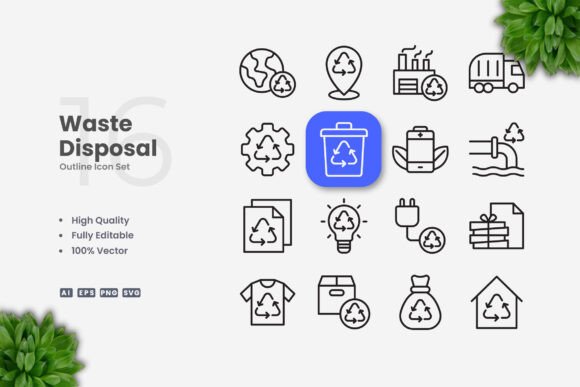
Waste Disposal Icons for Clean Modern Design
Visual communication shapes how people understand and interact with information. When it comes to waste management and recycling, clear imagery helps convey messages instantly across languages and cultures. Waste disposal icons serve this purpose by providing recognizable symbols that communicate disposal methods, recycling categories, and environmental messages at a glance.
These icons have become essential tools for designers, educators, business owners, and content creators who need to present waste-related information in a way that is both professional and easy to understand. Whether you are building a mobile app, designing a poster for a community cleanup event, or creating educational materials for a classroom, having a reliable set of icons makes your work more effective and visually cohesive.
What Makes Waste Disposal Icons So Useful
At their core, waste disposal icons are simple visual representations of concepts like recycling, composting, landfill disposal, hazardous waste, and reusable materials. Their strength lies in their simplicity. A well-designed trash bin icon or recycling arrow communicates meaning instantly without requiring text or explanation. This universal quality makes them valuable across many projects and platforms.
The icons in this collection are built as vectors, which means they are not made up of pixels but rather mathematical paths. This gives you tremendous flexibility. You can resize them from a tiny mobile app button to a large banner without any loss of quality. The crisp edges and clean lines remain intact at any size, which is something raster images cannot offer.
Another important characteristic is that every icon is fully customizable. You can change colors to match your brand palette, adjust stroke weight for different visual effects, or modify shapes to fit your specific needs. This level of control is especially helpful when you are working on projects that require consistency across multiple design elements.
Why You Might Need These Icons
Many people underestimate how much time and effort goes into creating consistent icon sets from scratch. If you have ever tried to design your own recycling symbols or waste sorting icons, you know how challenging it can be to achieve a uniform look. The icons in this set eliminate that struggle by offering a complete, professionally designed collection that you can use immediately.
For small business owners who manage recycling programs or waste reduction initiatives, these icons help create professional signage and educational materials without hiring a graphic designer. Bloggers and content creators who write about sustainability, zero waste living, or environmental topics can use them to make their articles more engaging and visually appealing. Educators can incorporate them into lesson plans about environmental science or community responsibility.
Marketers and entrepreneurs also benefit from having a ready-to-use icon set. Whether you are designing a social media campaign about earth-friendly practices or creating an infographic that explains waste sorting rules, these icons provide the visual backbone for clear communication. They save you time, reduce design frustration, and help you produce polished results even if you are not a professional designer.
Practical Uses Across Different Contexts
The versatility of waste disposal icons means they fit naturally into many kinds of projects. Let me walk through some realistic scenarios where they add real value.
Websites and Mobile Apps
If you run a website that covers recycling tips, waste management services, or environmental news, icons help guide visitors through your content. You might use a recycling icon next to a list of recyclable materials or a compost icon to highlight organic waste tips. In mobile apps, especially those that help users sort their trash or find nearby recycling centers, these icons become functional elements that improve the user experience. The clean design ensures they remain legible even on small screens.
Books and Educational Materials
Textbooks, workbooks, and children's books about the environment often rely on icons to reinforce learning. Waste disposal icons can illustrate concepts like the three Rs (reduce, reuse, recycle), composting cycles, or proper disposal of hazardous household items. Because they are simple and clear, they work well for young readers and non-native speakers alike.
Social Media and Infographics
Social media posts about sustainability need to grab attention quickly. Icons break up text-heavy content and make it more shareable. An infographic that explains how to sort waste into different bins becomes much more effective when each bin is represented by a distinct, easy-to-recognize icon. The PNG transparency files included in the set make it easy to layer icons onto custom backgrounds without awkward white boxes.
Flyers, Posters, and Banners
Printed materials require high-quality graphics that reproduce well at various sizes. A poster promoting a neighborhood cleanup event or a flyer explaining new recycling rules looks professional when icons are consistent and crisp. Since these icons are vectors, they print cleanly at any resolution. You can scale them up for a large banner or down for a small flyer without worrying about pixelation.
Print and Commercial Projects
Businesses that produce labels, packaging, or signage related to waste management can integrate these icons into their branding. A restaurant that wants to show customers how to sort their waste can place labeled bins with matching icons. A manufacturer of eco-friendly products can use icons on packaging to indicate recyclability or compostability. The editable stroke feature allows you to adjust line thickness to match your preferred aesthetic.
What You Get in the Files
The collection includes several file formats so you can work in whatever software you prefer. The AI source file works seamlessly in Adobe Illustrator, while the EPS Version 10 format is compatible with CorelDRAW and many other vector applications. SVG files are great for web use because they remain sharp on retina displays and can be embedded directly into HTML. PNG files with transparency give you a quick option when you need a ready-to-use image without opening a vector program. The included Readme.txt file provides basic instructions to help you get started quickly.
Important Things to Consider Before Using Waste Disposal Icons
Before you jump into your project, there are a few practical points worth keeping in mind. First, while the icons are fully customizable, you will need access to vector editing software like Adobe Illustrator or CorelDRAW if you want to change colors or stroke weights. The PNG files work fine for immediate use, but any customization will require a vector program.
Second, think about consistency across your project. If you use only a few icons from the set, make sure they fit naturally with any other visual elements you are using. The clean, simple style of these icons works best when paired with modern, uncluttered layouts. They may look out of place alongside highly detailed or photographic elements.
Third, consider your audience. Waste disposal icons are most effective when the concepts they represent are familiar to the people viewing them. If you are designing for an international audience, stick with universally recognized symbols like the recycling triangle or a simple trash can. For specialized content, you may want to add brief text labels to ensure clarity.
Fourth, remember that the preview mockups shown in promotional materials are not included. What you receive are the icon files themselves, ready for you to incorporate into your own designs. This is standard for icon sets and gives you the freedom to use them in your own mockups and layouts.
Getting the Most Out of Your Icons
To make the most of this collection, spend some time exploring the different icons available before you start designing. Familiarize yourself with the range of concepts covered so you can plan how each icon will support your message. Group related icons together for infographics or signage, and consider creating a consistent color scheme that reinforces your brand or topic.
If you are new to vector editing, start with small adjustments like changing a single icon's color to match your palette. As you grow more comfortable, experiment with stroke weight to create bolder or more delicate versions. The easy drag-and-drop functionality means you can quickly bring icons into your layouts without complicated workflows.
For web projects, SVG files are often the best choice because they load quickly and scale perfectly. If you are designing for print, the AI or EPS files give you maximum control over output quality. The PNG files with transparency are handy for quick mockups or when you need to share a preview with a client or colleague who does not have vector software.
Waste disposal icons are more than just decorative elements. They are practical tools that help you communicate clearly, save design time, and create professional-looking materials across a wide range of personal, educational, and commercial projects. Whether you are a seasoned designer or someone creating content for the first time, having a reliable set of clean, customizable icons makes your work easier and more effective.