Survival Icons: Clean Vector Icons for Any Project
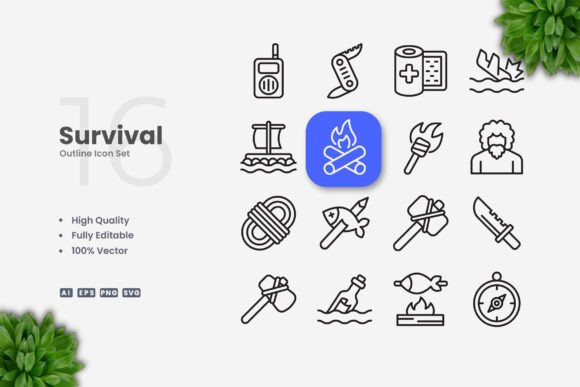
When you need visual elements that communicate clearly without clutter, Survival Icons offers a straightforward solution. This set of 100 vector icons follows a simple and clean design philosophy, making them suitable for a wide range of applications—from websites and mobile apps to printed materials like flyers, posters, and banners. The beauty of this collection lies in its adaptability: each icon comes with an editable stroke, so you can resize, change color, or adjust stroke weight using vector software such as Adobe Illustrator or CorelDRAW. Whether you are a professional designer, a small business owner, or a hobbyist working on a personal project, having a reliable set of icons that you can modify on the fly can save time and reduce frustration.
Why Simple and Clean Icon Design Matters
In visual communication, simplicity often leads to better understanding. Icons with clean lines and minimal detail are easier to recognize at a glance, which is especially important when you have limited space—like on a mobile app button or a social media post. Survival Icons embraces this principle by offering designs that avoid unnecessary ornamentation. Because the stroke weight is editable, you can match the icons to your brand’s visual identity without starting from scratch. For example, if your website uses a bold, thick-lined aesthetic, you can increase the stroke weight across the entire set in just a few clicks. On the other hand, if you prefer a lighter, more delicate look, you can thin the strokes to suit. This level of control means you are not locked into a single style; you can adapt the icons as your project evolves.
Another practical benefit is file compatibility. The set includes source files in AI, EPS Version 10, SVG, and PNG with transparency, along with a Readme.txt for quick reference. SVG files, in particular, scale beautifully to any size without losing quality, so your icons will remain crisp on everything from a business card to a billboard. The PNG transparency option is handy when you need a quick raster version without editing vector software. Overall, the clean design reduces cognitive load for your audience, helping them focus on your message rather than deciphering complex graphics.
How Survival Icons Supports Your Creative Workflow
Time is often a limiting factor in creative projects. Survival Icons helps you move faster by providing drag-and-drop files that integrate seamlessly into your existing workflow. Instead of drawing icons from scratch or searching through inconsistent libraries, you have a cohesive set ready to use. The 100 customizable vectors cover a range of survival-themed concepts, but the clean style makes them versatile enough for other contexts as well. For instance, an educator creating infographics about outdoor preparedness can drop an icon directly into their layout, adjust the color to match their school’s branding, and move on to the next element without delay.
Entrepreneurs and marketers will appreciate the flexibility when producing materials for social media or print campaigns. Suppose you are designing a series of banners for a safety workshop. With Survival Icons, you can pull the relevant icons, change their colors to align with your campaign palette, and export them as SVG or PNG for web and print use. Because the stroke weight is editable, you can ensure that all icons appear consistent whether they are displayed on a small mobile screen or a large poster. This consistency strengthens your visual communication and helps build recognition with your audience.
For freelancers and small business owners, the ability to edit icons without relying on a designer is a significant advantage. You can open the AI or EPS file, make adjustments, and have the final graphic ready in minutes. This autonomy reduces bottlenecks in your production process and gives you more control over the final look of your materials.
Real-World Applications Across Media
The range of uses for Survival Icons is broad, but certain scenarios highlight their value most clearly. In mobile app development, clean icons are essential for navigation and user experience. If you are building an app focused on outdoor activities or emergency preparedness, these icons provide intuitive visual cues that users can interpret quickly. Because the designs are simple, they render well on smaller screens without becoming pixelated or confusing.
In print, the editable stroke feature lets you adjust icons to work with different printing techniques. For example, if you are creating a flyer for a community event, you can thicken the strokes to ensure the icons remain visible in black and white or when printed at smaller sizes. Similarly, for posters and banners, you can scale the icons up without losing clarity, thanks to the vector format. The PNG transparency files are useful when you need a quick placeholder or a version for digital platforms that do not support vector formats.
Social media marketers can benefit from the clean aesthetic as well. Platforms like Instagram, LinkedIn, and Twitter reward visuals that are clear and professional. You can use Survival Icons to create custom graphics for posts, stories, or profile elements without needing advanced design skills. By changing the color to match your brand, you maintain a cohesive look across your channels.
Infographics and educational materials are another natural fit. The simple style helps readers absorb information without distraction, which is crucial when you are presenting data or step-by-step instructions. Publishers and bloggers can insert these icons into articles or ebooks to break up text and illustrate key points, making the content more engaging and easier to scan.
Who Benefits Most from This Icon Set
Professionals who regularly produce visual content will find Survival Icons particularly useful. Graphic designers can use them as a foundation and customize them for client projects, saving time on repetitive tasks. Marketing teams can maintain brand consistency by adjusting the icons to match their style guide. Educators and trainers can create clear, attractive materials that help learners grasp concepts quickly.
Entrepreneurs and small business owners who wear many hats will appreciate the efficiency. Instead of outsourcing icon design or struggling with complex software, they can edit the files themselves and keep projects moving. Hobbyists and freelancers working on passion projects can experiment with different styles without committing to a time-consuming design process.
However, it is worth considering that this set focuses on survival-themed concepts. If your project requires icons outside this theme—such as technology, finance, or healthcare—you may need to supplement this set with other resources. The clean, simple style does make them more adaptable than highly thematic icons, but the subject matter still leans toward a specific niche. Similarly, while the editable stroke is a strong feature, it requires some familiarity with vector software. If you are entirely new to programs like Adobe Illustrator or CorelDRAW, you may need to invest a little time learning the basics before you can make full use of the customization options.
Making the Most of the Included Files
The package includes AI and EPS Version 10 source files, which are widely compatible with most vector editing applications. SVG files are included for modern web use, and PNG transparency files offer a quick raster option. The Readme.txt provides basic instructions, but you can usually drag and drop the files directly into your workspace. Because the icons are organized and labeled, finding the right graphic for your project should be straightforward.
When editing, focus on adjusting stroke weight and color to achieve the exact look you need. You can also combine icons or scale them to fit different layouts. If you are designing a poster, you might enlarge a single icon as a focal point. For a mobile app, you might keep all icons small and uniform. The flexibility is there, and the results depend largely on your creative goals.
One practical recommendation is to create a master file with your preferred stroke weight and color scheme before you start inserting icons into individual projects. This way, you maintain consistency across all your materials and avoid repeating the same adjustments each time. If you work with a team, sharing this master file ensures everyone uses the same visual standard.
Thoughts on Fit and Limitations
No icon set is perfect for every situation, and Survival Icons is no exception. The survival theme gives it a distinct personality that works well for outdoor, safety, emergency, and preparedness contexts. If your brand or project aligns with these areas, the icons will feel natural and relevant. If you need something more abstract or universal, you might find the thematic focus limiting. That said, the clean design language does help bridge some of that gap, as the icons are not overly literal or cluttered.
Another consideration is the number of icons. With 100 vectors, you have a solid selection, but larger projects with many distinct concepts may require additional icon sets. The quality of the designs, however, means you can use them confidently in both professional and casual contexts. The editable stroke adds longevity to the set, as you can update the style without replacing the icons entirely.
For those who value simplicity and control, Survival Icons offers a practical, time-saving resource. It fills a specific need without overcomplicating the process. Whether you are building a website, designing a flyer, or creating social media graphics, these icons give you a reliable foundation to work from. The key is to evaluate whether the survival theme fits your project and whether you have the basic software skills to customize the files. If both conditions are met, you have a versatile tool that can support your visual communication across multiple media.