Evaluating Wireless Charging Icons for Modern Design Projects
Wireless charging has become a standard feature across smartphones, tablets, earbuds, and even laptop accessories. As this technology grows more embedded in everyday products, the need for clear, consistent visual representation becomes essential. Wireless Charging Icons, a vector-based icon set focused on this specific topic, offers a practical solution for designers and content creators who need reliable imagery for interfaces, documentation, and marketing materials.
This article provides an objective evaluation of the set, examining its design characteristics, practical applications, file format support, and overall suitability for different types of projects and workflows.
What Makes Up the Wireless Charging Icons Set
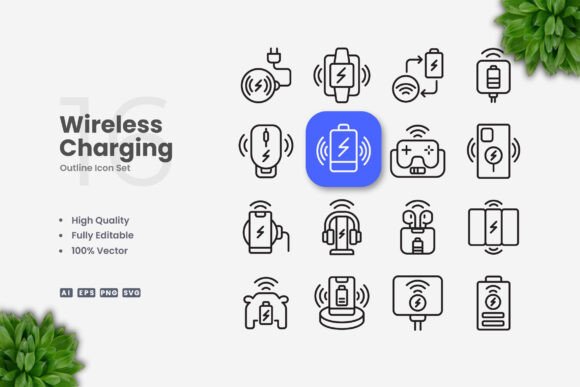
The set includes 100 vector icons centered on wireless charging concepts. These are not generic battery or power symbols, but rather dedicated icons meant to represent charging pads, charging indicators, device placement, signal strength, and similar functionality. The collection focuses on simplicity and clean lines, which makes it appropriate for both screen-based and print applications.
Each icon is provided in multiple file formats. The package includes an Adobe Illustrator source file (AI), an EPS version 10 file, SVG files, and PNG files with transparency. A readme file is also included for basic instructions. This range of formats supports a variety of workflows, from web development to print production, without requiring additional conversion steps.
Design Quality and Visual Consistency
The design language across the set is uniform. Stroke weights remain consistent, curves are clean, and negative space is used thoughtfully. This matters because icon sets often suffer from visual inconsistency when different symbols are drawn with varying line thicknesses or levels of detail. In this set, the icons appear to have been produced with a unified set of guidelines, which improves readability when multiple icons are used together in a single interface or layout.
The editable stroke feature is worth noting. In vector software such as Adobe Illustrator or CorelDRAW, you can adjust stroke weight across the entire set without redrawing each icon. This saves considerable time when adapting icons for different display sizes or print resolutions. If you need thinner lines for a mobile interface or thicker lines for a poster, the adjustment is straightforward.
Color customization is similarly simple. Because the icons are vector based, you can apply any color palette to match brand guidelines, dark mode themes, or specific document styles. This flexibility extends to the ability to flip, rotate, scale, or combine icons without loss of quality.
Practical Usability Across Media
The description lists a broad range of use cases: websites, mobile apps, books, social media, infographics, flyers, print materials, banners, and posters. This is not an exaggerated claim. A clean icon set with multiple format support genuinely works across all these contexts, provided the designer selects appropriate sizes and resolution settings.
For web and app use, the SVG format is particularly useful. SVG files render crisply at any resolution, load quickly, and can be styled with CSS for hover states or animations. The PNG files with transparency offer a fallback for platforms that do not support SVG, or for quick mockups where vector editing is not required.
For print projects, the EPS and AI formats provide high-resolution output. Icons scaled for flyers or posters will maintain sharp edges and consistent line weight, which is not always the case with raster-based alternatives. The 100-vector count gives enough variety to populate a brochure, infographic, or instruction manual without repeating the same symbol too frequently.
One practical example is creating a product instruction sheet for a wireless charging stand. You might need icons for plugging in a power source, placing a device correctly, and checking charging status. With this set, you can select appropriate symbols, adjust their size and color to match the document style, and export them alongside technical illustrations. The consistency of the set helps the final document look professionally produced.
File Format Support and Workflow Compatibility
The inclusion of AI and EPS version 10 files is a deliberate choice. EPS version 10 is compatible with a wide range of vector editing applications, not just Adobe products. If you work in CorelDRAW, Affinity Designer, or even older versions of Illustrator, the EPS files should open without compatibility issues. The AI files are more convenient for direct editing within Adobe software, especially if you want to maintain layers and grouped objects as the original author intended.
SVG files have become a standard for digital design. They are human-readable, compressible, and easy to integrate with code. Developers can open an SVG file, extract the path data, and embed it directly into a web page or React component. This eliminates the need for icon font dependencies or image sprites for many use cases.
The PNG transparency files serve a different purpose. They are ready to use immediately for mockups, email signatures, or social media graphics where opening a vector editor is not practical. However, the exact resolution of these PNG files is not specified in the product description. For print projects, you will likely want to export your own high-resolution PNGs from the vector sources rather than relying on pre-rendered files. This is a common consideration with icon sets and not a limitation unique to this product.
Who Benefits Most from This Icon Set
Freelancers and small agency designers will find the set useful for client projects that involve technology products or instructional content. Having a dedicated wireless charging icon set saves the time of sourcing icons individually from libraries that may have inconsistent styles or missing symbols.
User interface and user experience designers working on mobile apps or websites for electronics brands can use these icons to build account screens, product comparison pages, or setup guides. The clean style integrates well with modern design systems that emphasize minimal visual noise.
Content creators and social media managers might use the icons in blog posts or infographics that explain wireless charging technology to a general audience. The clarity of the symbols helps communicate concepts without relying on lengthy captions.
Educators and technical writers can incorporate the icons into presentation slides or training materials. For example, a slide comparing wired and wireless charging speeds might include a charging pad icon alongside a cable icon to visually differentiate the two methods.
Print designers working on packaging, flyers, or point-of-purchase displays for wireless charging accessories have a ready source of symbols that match the product category. This avoids the licensing concerns that sometimes arise with stock photography or unlicensed icon use.
Limitations to Consider
No icon set is universal, and this one has some natural boundaries. The 100 icons focus specifically on wireless charging. If your project needs broader technology symbols such as Bluetooth, Wi-Fi, USB ports, or device types, you will need to supplement this set with additional resources. The collection is deliberately narrow, which is a strength for specialized projects but a limitation for those needing a comprehensive technology icon library.
Another point is that the preview mockup shown in product listings is not included with the purchase. This is stated clearly in the notes, but it is worth repeating so that expectations are set correctly. You receive the icon files, not a pre-designed layout or template.
Additionally, while the editable stroke feature is useful, it works best when you maintain proportional relationships between icons. If you globally increase stroke weight, some icons with tight spaces may fill in or lose clarity. This is a characteristic of any stroke-based icon set and requires some testing when making large adjustments.
Long-Term Value and Reusability
A vector icon set like this one does not become obsolete with software updates or design trends. The files are based on standard formats that have been supported for decades. You can archive the AI or EPS files and open them years later for reuse in new projects. This makes the set a one-time purchase with ongoing utility, unlike subscription-based icon libraries that require continued payment for access.
The topic of wireless charging is also likely to remain relevant. As more devices adopt wireless charging standards, the need for related icons will persist. Investing in a dedicated set now provides a resource you can draw from repeatedly for different clients or projects.
Final Observations
Wireless Charging Icons offers a focused, well-structured collection of vector symbols for a specific technology category. The design is simple and consistent, the file format support is thorough, and the editable stroke feature adds practical flexibility. It is best suited for designers, content creators, and professionals who need clear visual communication around wireless charging concepts and want a reliable source that integrates smoothly with standard vector editing software.
For those whose work regularly touches on consumer electronics, product documentation, or instructional design, this set provides a solid foundation. The limitations around scope are clearly defined, and the long-term reusability of vector assets offsets the lack of a preview mockup or pre-built layouts. If the topic aligns with your project needs, the set is a practical addition to a design resource library.