Trophy Icons: A Practical Choice for Clean, Customizable Vector Graphics
When you need a visual symbol to represent achievement, success, or a milestone, trophy icons are often the first image that comes to mind. But not all trophy icons are created equal. The set known simply as Trophy Icons offers a distinctive combination of simplicity, editability, and format flexibility that makes it a strong candidate for many projects. If you are evaluating icon resources for a website, mobile app, infographic, print piece, or social media graphic, understanding what this collection offers—and where it might fall short—can help you decide whether it fits your workflow and creative goals.
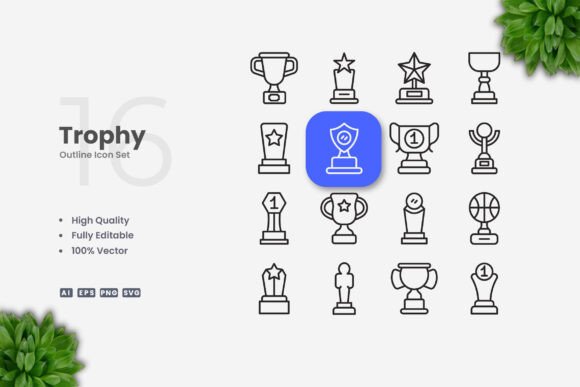
Trophy Icons is a collection of 100 vector icons designed with a clean, minimal aesthetic. Each icon is built with editable strokes, meaning you can adjust line thickness, color, and other attributes without losing quality. The set includes source files in Adobe Illustrator (AI), EPS version 10, SVG, and PNG (with transparency). A Readme.txt file guides you through the files. The preview mockups are not included, so what you get are the raw vector assets ready for import into vector software such as Adobe Illustrator or CorelDRAW.
What Makes Trophy Icons Distinct from Other Icon Collections
The most notable feature of Trophy Icons is its emphasis on clean, simple icon design. These are not overly detailed, photorealistic trophies. Instead, they are line-art style symbols that convey the essence of a trophy—cup shapes, stars, ribbons, medals, laurels, and related elements—using a restrained visual language. This approach gives them a modern, versatile look that works across many contexts without clashing with other design elements.
Another distinguishing factor is the editable stroke weight. Many icon sets offer only fixed stroke widths, which can be limiting when you are scaling icons for different display sizes or trying to match an existing brand style. With Trophy Icons, you can open any vector file in Illustrator or CorelDRAW and adjust the stroke thickness, change colors from solid to gradient, or even expand strokes to create filled shapes. This level of control is particularly valuable for designers who need consistency across a suite of assets.
The file format selection is also broader than what many free or inexpensive icon packs provide. You get both AI and EPS (Version 10) for professional vector editing, SVG for web and responsive design, and PNG for quick use in presentations or social media. The inclusion of all these formats in a single download saves time and eliminates the need to convert files yourself.
Comparing Trophy Icons with Other Icon Options
When you compare Trophy Icons to other ways of sourcing trophy graphics, several tradeoffs emerge. Free icon websites often provide raster PNG files or low-quality SVGs that may not have clean geometry. Paid icon libraries sometimes offer more extensive sets, but they may require a subscription or per-icon cost. Trophy Icons sits in a middle ground: you pay once for a focused set of 100 icons, all highly customizable.
Another alternative is creating your own trophy icons from scratch. That route offers complete control over style, but it is time-consuming and requires vector illustration skills. For many professionals, the tradeoff is not worth it when a ready-made set like Trophy Icons can be adapted quickly. Similarly, using an icon font (such as those from icon font libraries) gives you scalability and easy color changes via CSS, but you lose the ability to edit stroke weight or adjust individual anchor points. With Trophy Icons, you have true vector editing capability.
A limitation to consider: the set contains exactly 100 icons. While that number covers a broad range of trophy-related symbols—such as first-place cups, participation ribbons, laurel wreaths, medals, and winner podiums—it may not include every variation you need. If your project requires a very specific trophy shape, a sport-specific design, or multiple angles of the same trophy, you might need to supplement this set with icons from another source or create custom additions. The simplicity of the icons also means they lack intricate details that some high-end branding might demand.
Strengths in Versatility: Where Trophy Icons Shine
One of the strongest arguments for choosing Trophy Icons is the range of media it supports. Because the files are supplied in both vector and raster formats, you can use them in contexts as varied as:
- Websites and mobile apps – SVG files integrate directly into responsive designs, and you can change colors with CSS or by editing the SVG code.
- Infographics and data visualization – Clean trophy icons add meaning without visual clutter. You can resize them freely to match chart dimensions.
- Print materials – Flyers, banners, posters, and brochures benefit from the high-resolution vector (AI/EPS) files that print sharp at any size.
- Social media graphics – PNG files with transparency let you drop icons directly into images, stories, or posts.
- Books and editorial design – Simple line-art trophies work well as chapter markers or sidebar illustrations.
The drag-and-drop ease is another strength. Even if you are not a professional designer, you can open the AI or SVG file, choose an icon, and drop it into your project with minimal friction. The Readme.txt file provides basic instructions, which helps avoid confusion with file types.
Tradeoffs and Limitations to Keep in Mind
No single icon set is perfect for every scenario, and Trophy Icons has its constraints. The design philosophy is deliberately simple, so if your brand or project calls for a more ornate, hand-drawn, or three-dimensional trophy, this set will not deliver that look. You would need to look for more stylized alternatives or commission custom illustrations.
Another practical point: the preview mockups are not included. The package contains only the icon files themselves. If you need to see how the icons might appear on a shirt, a website, or a flyer before committing, you must create mockups yourself or rely on your design software’s preview features. This is typical for raw asset packs, but some competing products include ready-made mockups as a bonus.
File organization is straightforward but basic. The icons are grouped in the source files, but you may need to spend a few minutes locating the specific trophy variant you need. For a designer who prefers a highly organized icon library with tagging or searchable previews, this set may feel slightly less refined than offerings from large stock asset platforms.
Decision Factors: When Is Trophy Icons the Right Choice?
Think about your own workflow and requirements. Trophy Icons is a strong match if you:
- Value the ability to edit stroke weight and color across multiple icons without starting from scratch.
- Work in both digital and print environments and need file formats that cover both without additional conversion.
- Prefer a clean, minimalist aesthetic that does not compete with other design elements.
- Need a reasonably sized set of trophy-related icons for a project that doesn’t require hundreds of highly specialized variations.
- Are comfortable editing vector files in software like Adobe Illustrator or CorelDRAW.
On the other hand, you might want to look elsewhere if you:
- Require a highly detailed, realistic trophy illustration with shading and texture.
- Need an icon set that includes a wide variety of non-trophy objects as part of a larger collection.
- Prefer to avoid vector editing entirely and want icons that work out of the box with no customization.
- Expect a dedicated customer support team or extensive documentation for the icon set.
Practical Examples of Usage
Imagine a mobile app developer building a fitness app that awards badges for completing workout milestones. The developer needs trophy icons that can appear in a small circular badge, on a leaderboard, and on a shareable achievement card. With Trophy Icons, the developer can take the SVG file for a cup shape, adjust the stroke to match the app’s UI thickness, and change the color to the app’s accent color. The same icon can be exported at different sizes without quality loss. For the shareable card, the PNG version can be used directly in the social media image generator.
Another scenario: a graphic designer is creating a large printed poster for a school’s awards ceremony. The poster uses several trophy icons to indicate different categories. Using the AI source file, the designer scales the icons to fit alongside text, changes the stroke weight so that they remain visible at the poster’s viewing distance, and adds a subtle gold gradient. The final file outputs at 300 DPI cleanly. This would be cumbersome with a raster-only icon set.
How to Get the Most from Trophy Icons
To maximize the value of this set, take advantage of the editable strokes early in your project. Open the AI or EPS file in your vector editor, select all the icons you plan to use, and adjust the stroke thickness to create a consistent visual weight across your design. You can also group icons that share colors, then apply color updates globally. Because the icons are 100% vector, you can combine multiple shapes to create composite icons if needed—for instance, placing a star icon on top of a cup to create a new symbol.
If you are working on a team, the file formats make collaboration straightforward. A web developer can use the SVG files directly, while a print designer uses the AI files. The readme file explains what each format is for, reducing confusion. Because no mockups are included, you might want to create a quick visual reference sheet yourself by importing all icons into a document and labeling them—this can streamline future selection.
Final Considerations for Your Decision
Choosing an icon set always involves balancing aesthetics, functionality, and cost. Trophy Icons offers a focused solution for those who need clean, customizable trophy symbols across multiple media. Its strength lies in its simplicity and editing freedom, not in variety or high detail. If your project aligns with that profile, it can save you hours of manual design work. If you need something more elaborate or extensive, you have other options to explore. By understanding exactly what this set provides and where its boundaries lie, you can make a confident choice that supports your creative or professional goals.