Testimonials Icons for Every Creator and Professional
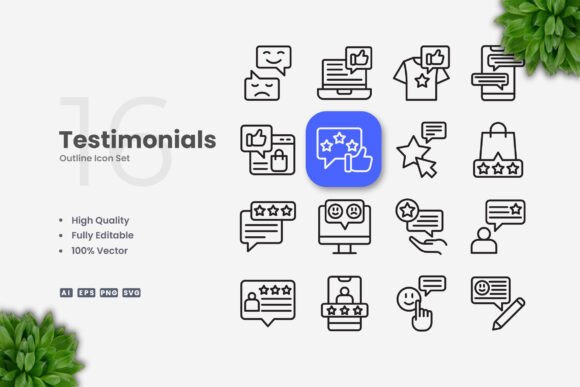
If you have ever needed to display client feedback, user reviews, or customer praise in a visual way, you already know how much a small icon can change the feel of a layout. Testimonials Icons are exactly what the name suggests — a set of vector icons designed to accompany or represent testimonial content. They include symbols like quote marks, speech bubbles, stars, thumbs up, profile silhouettes, and rating badges that help reinforce trust and social proof at a glance. These icons are not just decorative; they serve a functional role in guiding the eye toward positive feedback and building credibility with your audience.
What makes this particular set stand out is the emphasis on simplicity and cleanliness. Every icon is built with a minimal silhouette or outline style that avoids visual clutter. Because the files are 100% vector, you can scale them from a tiny social media badge to a full-page print graphic without losing sharpness. The stroke weight is editable, the colors are fully customizable, and the entire package works with familiar software like Adobe Illustrator and CorelDRAW. Whether you are designing for web, mobile, print, or video, these icons adapt to your workflow rather than forcing you to adapt to them.
Why Different Audiences Find Value in Testimonials Icons
A single icon set can serve very different purposes depending on who is using it. A freelancer building a personal portfolio site has different priorities than a marketing team producing a quarterly report. The beauty of a clean, vector-based icon set is that it respects those differences. You are not locked into one style or one use case. You can treat the icons as building blocks that fit your own creative process, whatever that looks like.
Beginners and Non-Designers
If you are just starting out with design or you do not consider yourself a visual person, the most important thing is simplicity. You need assets that work without a steep learning curve. Testimonials Icons come with PNG transparency files, which means you can drag and drop them directly into a website builder, a social media post, or a flyer template without opening any vector software. The included readme.txt file explains the folder structure so you know exactly which format to use for which purpose.
For example, a small business owner creating a testimonial page on their WordPress site can drop in a quote icon next to each client review in under a minute. A blogger adding a sidebar with customer praise can use the star icons to represent ratings without worrying about pixelation or background color clashes. The key here is that you do not need to be a designer to get professional-looking results. You just need files that are ready to use and forgiving of early mistakes.
Professional Creatives and Agencies
On the other end of the spectrum, experienced designers and studios care about flexibility and precision. When you work with multiple clients across different industries, you need icons that can be reshaped, recolored, and reweighted to match each brand identity. The AI, EPS, and SVG files give you full control over every anchor point. You can adjust the stroke weight to match your typography, swap the fill to a brand color, or even combine multiple icons into a custom graphic.
Imagine you are designing a landing page for a SaaS company that offers customer support software. The testimonial section needs to feel trustworthy but also modern. You can take the speech bubble icon, change the stroke to the brand blue, add a subtle opacity layer, and place it behind the quote text. Because the stroke is editable, you can also thin it out to match the interface light design. This level of control is hard to find in raster icon sets, and it saves hours of manual redrawing.
Practical Applications Across Projects
Testimonials Icons work in many contexts because they are designed to stay out of the way. They support content without stealing attention. That is a surprisingly rare quality in icon design, and it matters differently depending on your project type.
- Websites and mobile apps — Use quote marks or profile icons in testimonial carousels, review sections, or about pages. The SVG format loads quickly and scales to retina displays without blur.
- Social media and infographics — Star and rating icons fit well in comparison graphics or highlight reels. You can color them to match your brand palette in seconds using vector software.
- Print materials — Flyers, brochures, posters, and banners benefit from the high resolution of vector files. A quote icon at the bottom of a flyer adds a subtle trust signal without overwhelming the layout.
- Books and ebooks — Testimonial icons work well in introduction sections or back-cover praise lists. The clean line style keeps printed pages looking airy and professional.
Customization That Matches Your Workflow
One of the strongest arguments for choosing a vector icon set over a raster one is the ability to tailor it to your specific needs. Testimonials Icons are designed with an editable stroke, which means you can increase or decrease the thickness of every line without redrawing anything. If your project uses a bold sans-serif font, you can thicken the icons to match. If your design leans minimalist and thin, you can reduce the stroke weight with a single slider in Illustrator or CorelDRAW.
Color changes are equally straightforward. Unlike PNGs that lock you into pre-selected colors, vector files let you apply any hex value, gradient, or pattern. A hobbyist designing a personal blog might prefer warm tones that feel friendly. An educator preparing a course slide deck might want high-contrast colors that project well in a classroom. Both can achieve their goal in under thirty seconds because the files are built for editing, not for static use.
What Comes in the Package
Knowing what you get helps you decide if the set fits your workflow. The included files are clearly organized so you are not hunting through folders:
- Source File Ai (Adobe Illustrator native format)
- EPS Version 10 (compatible with many older and newer vector programs)
- SVG File (ideal for web and responsive design)
- PNG Transparency (ready-to-use raster format with no background)
- Readme.txt (quick reference on file usage)
One important note — the preview mockup shown in promotional images is not included. The product is the icon set itself, not the staged presentation. That is actually a positive if you plan to use the icons in your own unique layout, because you are not paying for a mockup you will never need.
Is This Icon Set Right for You?
The best way to answer that question is to look at your current project and your comfort level with design tools. If you need testimonial visuals but have no experience with vector software, the PNG files give you a fast entry point. You can start using them immediately and explore the editable formats as your skills grow. If you are already comfortable with Illustrator or CorelDRAW, the AI and EPS files give you full professional control.
For entrepreneurs and small business owners who want to build trust quickly, the simplicity of these icons means you can add social proof to your site or marketing materials without hiring a designer. For educators creating course materials or classroom presentations, the clean line style keeps information readable and distraction-free. For marketers producing social media graphics or ad creatives, the editable stroke and color options let you match brand guidelines exactly.
The long-term usefulness of a vector icon set comes down to how often you reuse it across different contexts. Because Testimonials Icons are not tied to any specific color scheme or layout, they can stay in your asset library for years. You can pull them into new projects, resize them for different formats, and tweak the styling as your brand evolves. That kind of flexibility is harder to achieve with pre-styled raster graphics, and it makes the upfront investment in vector files worthwhile for anyone who produces content regularly.
Final Thoughts on Choosing Testimonials Icons
Deciding whether a particular icon set matches your needs comes down to three things: the clarity of the design, the range of file formats, and how much control you have over customization. Testimonials Icons deliver on all three fronts without adding complexity. The design is simple and clean, the file package covers both vector and raster workflows, and the editable stroke and color options put you in charge of the final look.
Whether you are a freelancer building your first portfolio, a small business owner creating a landing page, a teacher assembling lecture slides, or a designer producing client assets, these icons offer a practical foundation. They do not try to do everything at once. Instead, they focus on the one thing that matters most in testimonial design — helping your audience see and trust the voices of others clearly.