Free Gift Icons for Clean and Versatile Design
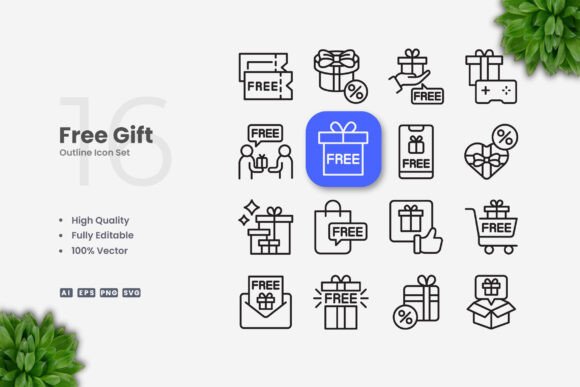
Finding the right visual elements for a project often takes more time than expected. Icons need to be clear, consistent, and adaptable across different formats. Free Gift Icons offers a collection of simple and clean icon designs that work across websites, mobile apps, books, social media, infographics, flyers, print materials, banners, posters, and many other applications. The set includes 100 vector icons with editable strokes, making it straightforward to resize, change colors, or adjust stroke weight using vector software such as Adobe Illustrator or CorelDRAW.
What Makes Free Gift Icons Useful for Everyday Projects
Icons serve a functional purpose: they communicate ideas quickly without relying on lengthy text. When icons are overly complex or cluttered, they can confuse rather than clarify. The Free Gift Icons collection focuses on simplicity, which helps viewers grasp the intended message at a glance. Each icon uses clean lines and minimal detail, reducing visual noise while preserving meaning. This approach is especially valuable for interfaces where space is limited, such as mobile app buttons, navigation menus, or social media posts.
Beyond clarity, the editable stroke feature gives you control over the visual weight of each icon. You can thicken or thin the lines depending on your design context. For example, a bold stroke may work better for a poster seen from a distance, while a finer stroke might suit an infographic viewed up close. Because the files come in AI, EPS, SVG, and PNG formats, you can choose the best format for your workflow without needing to convert or redraw anything.
Websites and Mobile Apps
For digital products, icon consistency directly affects usability. Using a unified icon style across a website or app helps users navigate with less friction. Free Gift Icons provides a cohesive look, so your buttons, menus, and feature lists feel intentionally designed rather than pieced together from different sources. The SVG files integrate easily into code, and the PNG transparency allows quick placement without background issues.
Books and Educational Materials
Printed or digital books benefit from icons that supplement text without distracting from it. Simple icons can illustrate concepts, mark chapters, or highlight key points. Because these icons are clean and uncluttered, they complement body text rather than compete with it. An educator preparing a workbook or a publisher designing a reference guide can place icons alongside explanations to improve comprehension, especially for visual learners.
Social Media and Infographics
Social media posts often rely on visual hooks to stop scrolling. An icon paired with a short message can convey a topic faster than a block of text. Infographics, by nature, depend on visual hierarchy and clear symbols. Free Gift Icons works well in both contexts because the simple style keeps the focus on the data or message rather than on decorative flourishes. Marketers and content creators can mix icons with charts, statistics, or short headlines without worrying about style mismatches.
Flyers, Banners, and Posters
Printed materials require icons that remain legible at various sizes. A poster might display icons at a large scale, while a flyer may use them smaller alongside text. The vector format lets you scale any icon without losing quality, and adjusting the stroke weight helps maintain readability across sizes. Small business owners designing promotional materials can save time by starting with a ready-to-use icon set instead of commissioning custom illustrations.
Who Benefits Most from This Icon Set
Freelancers and solo creators often juggle multiple roles, from design to content creation. Having a versatile icon library reduces the need to switch between tools or search for new assets for each project. Similarly, small business owners who manage their own marketing materials can reuse these icons across a website, social media profiles, and printed brochures, ensuring a consistent brand presence without hiring a designer for every small task.
Educators and publishers working with limited budgets may also find value in a single icon set that covers multiple use cases. Instead of purchasing separate icon packs for different projects, this collection provides 100 icons that can be adapted through color changes, resizing, and stroke adjustments. The editable vector files make it possible to align icons with existing brand colors or style guides without starting from scratch.
Marketers who produce regular content for social media, blog posts, or email newsletters can maintain visual consistency by relying on the same icon set across platforms. When audiences repeatedly see the same icon style, they begin to associate it with your content, which strengthens recognition over time.
Customization Without Complexity
One advantage of vector icons is the ability to modify them without redrawing. The Free Gift Icons files include editable strokes, so you can adjust thickness, change colors, and resize elements directly in software like Adobe Illustrator or CorelDRAW. If you prefer a minimalist look with thin lines, you can reduce the stroke weight. If you need icons that stand out on a busy background, you can increase the stroke weight or apply a contrasting color.
The included PNG files with transparency offer a quick option for users who do not need to edit the icons further. You can drag and drop them directly into a design tool, presentation, or document. This flexibility saves time, especially when working under deadlines where every minute counts.
What to Keep in Mind
While this icon set covers a broad range of applications, it may not suit every specialized need. The style is deliberately simple and clean, which means it works best in contexts where minimalism is appropriate. If your project requires highly detailed or illustrative icons, you might need a different collection. Similarly, the set includes 100 icons, which is enough for many common scenarios, but larger projects with very specific icon requirements may need additional assets.
The preview mockup is not included, so you will not see how the icons appear in a staged setting. However, the source files themselves are ready to use, and you can test them directly in your own layouts. If you are comparing icon sets, consider how easily you can adapt each one to your preferred software and workflow. Vector files are generally more flexible than raster images, and having AI, EPS, and SVG options gives you room to work in different environments.
How This Supports Your Creative Process
Starting a project with a solid set of icons removes one decision from your workflow. Instead of hunting for individual icons that match each other in style and weight, you can open one folder and find everything you need. This may seem like a small advantage, but over multiple projects, the time saved adds up. For professionals who produce content regularly, reducing friction in the early stages of design often leads to better final results because you can focus more on layout, message, and audience.
The editable nature of the files also encourages experimentation. You can try different color palettes, stroke thicknesses, and sizes without fear of ruining the original. If a particular variation does not work, you can revert to the original file and try again. This kind of flexibility supports creative iteration, which is especially useful when refining a visual identity or testing different design directions.
Practical Recommendations for Getting Started
If you plan to use these icons across multiple projects, create a folder structure that separates original files from customized versions. This helps you avoid confusion later when you need to locate a specific variation. Consider setting up a template document in your vector software with your preferred stroke weight and color swatches applied, so you can edit icons consistently.
For web use, SVG files offer good performance and scalability. For print, EPS or AI files may be more appropriate depending on your workflow. The PNG files with transparency work well for quick mockups, presentations, or any situation where you need a ready-to-use image without further editing.
If you are new to vector editing, the readme.txt file included with the set provides basic guidance. You can also find many tutorials online that cover resizing, color changes, and stroke adjustments in Adobe Illustrator or CorelDRAW. Even minimal experience with vector software will allow you to make the most of these files.
Final Thoughts
Free Gift Icons offers a practical solution for anyone who needs clean, simple icons that can adapt to different mediums and sizes. The combination of editable vector files, multiple formats, and straightforward customization options makes it suitable for a wide audience, from freelancers and educators to marketers and small business owners. By focusing on clarity and flexibility, this icon set helps you communicate ideas effectively while saving time on repetitive design tasks. Whether you are building a website, designing a flyer, or creating social media content, having a reliable icon library simplifies your process and supports better visual communication.