Chemistry Solid Icons for Modern Design
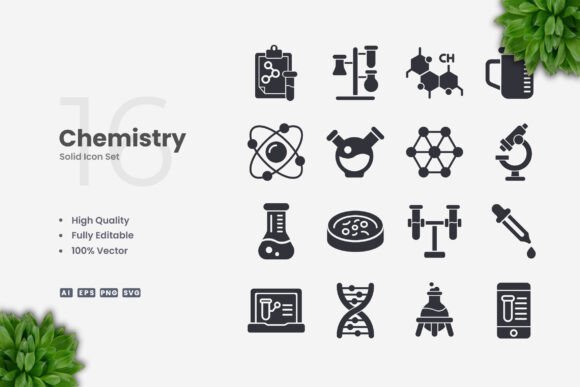
Vector icon sets are everywhere, but few offer the clarity and usefulness of a well-crafted chemistry collection. Chemistry Solid Icons deliver exactly that: a focused library of vector illustrations that balance scientific precision with clean, modern aesthetics. Whether you are building a mobile app, designing an infographic, or putting together print materials for a science event, these icons give you a solid foundation to work with. The best part is the simplicity. Each icon uses a filled, consistent style that reads clearly at any size, making it a reliable choice for both digital and print projects.
What makes this set stand out is its versatility. You get over one hundred vector files covering essential chemistry symbols—flasks, beakers, molecules, atom structures, test tubes, lab equipment, and more. Because everything is built as a vector, you can resize, recolor, and rearrange each icon without losing quality. This means one set can serve an entire campaign: small enough for a social media post, large enough for a poster, and crisp enough for a book illustration. The included source file in AI format, along with EPS 10, SVG, and PNG transparency, ensures that no matter what software you use—Adobe Illustrator, CorelDRAW, or even free vector tools—you can open the files and start editing immediately.
Why Solid Icons Work for Science and Education Projects
Solid icons have a visual weight that outline icons sometimes lack. For chemistry content, this weight translates into authority and clarity. A filled flask icon, for example, reads instantly as a laboratory symbol. It does not get lost on busy backgrounds or compete with surrounding text. This is especially important when you are designing for audiences that need quick recognition: students flipping through a textbook, visitors scanning a science fair poster, or users navigating an educational app. The solid style also works well with bold color choices, which can help you create a memorable visual identity for a brand or publication.
For educators and publishers, the Chemistry Solid Icons set offers a way to maintain consistency across different materials. You can use the same icons on a worksheet, a slideshow, and a classroom poster. Because each icon shares the same style, the overall look stays cohesive. This reduces the time spent searching for matching graphics or trying to unify disparate design elements. The icons also work beautifully in monochrome, which is useful for black-and-white printing or for designs where color is used sparingly.
Web and Mobile App Design
If you are designing a science-themed website or a chemistry learning app, these icons can serve as navigation elements, category markers, or visual cues for interactive features. Use the atom icon for a “theory” section, the test tube for “experiments,” and the molecule for “compounds.” The solid fill ensures that each icon remains visible even on small screens. You can also adjust the colors to match your brand palette without worrying about transparent gaps or uneven strokes. For mobile apps where space is limited, the simplicity of these icons helps users find what they need quickly.
Infographics and Data Visualization
Infographics rely on visual shorthand. A single icon can replace a paragraph of explanation. With Chemistry Solid Icons, you can illustrate chemical processes, lab setups, or safety symbols without cluttering the layout. For example, an infographic about water purification could use the flask icon to represent testing, the molecule icon for chemical structure, and the dropper icon for adding reagents. Because all icons are vector-based, you can scale them up for a headline graphic or down for a footnote. The PNG files with transparency also allow you to drop icons directly into design tools like Canva, PowerPoint, or Photoshop without needing to remove backgrounds.
Print Materials: Flyers, Posters, and Banners
Print projects demand high-resolution graphics. Raster images can pixelate when enlarged, but vectors remain sharp at any size. This makes Chemistry Solid Icons ideal for posters advertising a science fair, banners for a chemistry department, or flyers for a lab workshop. You can arrange multiple icons to create a border pattern, use a single large icon as a background element, or combine icons with typography to build a headline. The EPS 10 file format is widely supported by professional printing services, so you can send the files directly to a printer with confidence.
Social Media and Digital Marketing
Social media posts need to grab attention fast. A clean, bold icon paired with a short message can stop the scroll. Use a beaker icon to promote a new blog post about chemistry experiments, or an atom icon to announce a webinar on molecular science. The solid style works well with both light and dark mode layouts. You can also create a series of posts using the same icon set, which builds visual consistency across your feed. The included SVG files are lightweight and load quickly, which is a bonus for websites and online ads.
Adapting the Icons for Different Audiences
One of the strengths of this icon set is its ability to speak to different groups without changing the core design. For a younger audience, you can use bright, playful colors and pair the icons with rounded typography. For a professional or academic audience, muted tones and a clean layout will convey seriousness and precision. The icons themselves are neutral enough to fit either direction. Small business owners who create their own marketing materials can repurpose the icons across product labels, instructional sheets, and website graphics without hiring a designer. Freelancers and creative professionals can use the set as a starting point for client projects, saving hours of custom illustration time.
For bloggers and content creators, the icons add visual interest to articles and tutorials. A step-by-step guide to a chemistry experiment becomes easier to follow when each step is accompanied by a corresponding icon. The set also includes symbols that can represent abstract concepts like temperature, pressure, or chemical bonds, which helps break down complex ideas into digestible visuals.
Practical Tips for Customization and Consistency
Getting the most out of Chemistry Solid Icons requires a bit of planning, but the process is straightforward. Start by opening the source file in Adobe Illustrator or CorelDRAW. All icons are organized as individual vector shapes, so you can drag and drop them into your project. If you need a specific color palette, select an icon and change its fill color. Because the design is solid, there are no stroke lines to adjust—just one clean shape per icon.
To keep your designs consistent, decide on a color scheme before you start. Use two or three core colors for your icons and stick with them across all materials. If you are creating a series of infographics, use the same icon style for each section. This repetition builds familiarity with your audience. For multi-page documents, consider creating a master icon legend that shows each icon alongside its meaning. This is especially helpful for textbooks, manuals, or any content that will be referenced repeatedly.
Another useful approach is to combine icons with other vector elements like lines, arrows, or circles. You can place an icon inside a circular badge to create a branded marker for different topics. Or you can line up several icons horizontally to form a process flow. The simplicity of the solid style means these combinations stay clear and uncluttered.
Realistic Examples to Inspire Your Next Project
Imagine you are designing a workshop flyer for a local science center. You need to communicate three main activities: a chemistry demo, a lab tour, and a Q&A session. Use the flask icon for the demo, the microscope icon for the lab tour, and the question mark icon (if available) or a combination of icons to represent the Q&A. Place each icon above its corresponding text block, and use a bright accent color for the icons while keeping the background neutral. The result is a flyer that is easy to scan and visually engaging.
Or consider a chemistry textbook chapter on acids and bases. You could use the pH scale icon as a chapter opener, the flask icon for experimental setups, and the molecule icon to illustrate chemical structures. Because all icons share the same solid style, the chapter feels unified even if the content covers multiple topics. The PNG transparency files also allow you to overlay icons on full-color photographs, which can add a contemporary feel to the layout.
For a social media campaign, create a weekly series of posts where each day highlights a different chemistry concept. Monday could feature the atom icon with a fun fact about electrons, Tuesday the beaker icon with a quick experiment idea, and so on. Over time, your audience will associate the icons with your brand, making your content more recognizable.
Keeping Your Designs Clear and Audience-Friendly
No matter how you use the icons, clarity should remain your top priority. Avoid overcrowding a layout with too many icons. Give each icon enough space to breathe, and pair it with concise text. If you are designing for an international audience, remember that some chemistry symbols are universal. The Chemistry Solid Icons set focuses on commonly recognized shapes, which reduces the need for additional explanations. Test your design on different devices or print proofs to ensure that the icons read well at the intended size.
When customizing colors, consider accessibility. High contrast between the icon and its background helps users with visual impairments. Solid icons already provide good contrast because the filled shape is distinct. Avoid using color as the only way to convey meaning—pair each icon with a label or description whenever possible.
File Management and Workflow Tips
The included files are organized in a straightforward way. The AI source file gives you full editing control. The EPS 10 version is compatible with older software and can be imported into many applications. The SVG files are ready for web use, and the PNG files with transparency are perfect for quick placements. The readme.txt file contains basic instructions, but you will likely find the process intuitive. Keep the files in a dedicated folder on your computer or cloud storage, and label them by category (e.g., “flasks,” “molecules,” “lab equipment”) for easy access. This is especially helpful when you are working on multiple projects at the same time.
If you collaborate with other designers or team members, consider sharing the SVG files, as they are lightweight and can be opened in a wide range of tools. For client handoffs, the EPS or AI formats are usually preferred because they preserve the vector structure. Whichever format you choose, the icons retain their quality and editability.
Final Thoughts on Using Chemistry Solid Icons
Great design tools do not have to be complicated. Chemistry Solid Icons prove that a focused, well-executed set of vectors can elevate projects across media and audiences. Whether you are an educator building a curriculum, a marketer launching a campaign, or a freelancer delivering a client brief, these icons give you a reliable visual language. The clean design, easy customization, and broad file format support mean you spend less time on technical adjustments and more time on creative decisions. That is the kind of efficiency every designer and content creator can appreciate.